🏂 December 4, 2025 / Mermaid diagrams, Collapse and expand all levels in Tables

Our Larnaca retreat is over, and you can enjoy some photos. Now we’re back on track with the first winter release :snowboarder:!

Mermaid diagrams in rich text

Mermaid diagrams were added unexpectedly into Fibery rich text fields, so now you can type /mermaid or /diagram and create beautiful (and ugly) mermaid diagrams (and charts).

Fibery AI can generate mermaid diagrams as well. For example, you can ask it to create diagram for some space with all databases and relations. Check Mermaid diagrams in Fibery user guide for more details.

Collapse and expand all levels in tables and lists

Mircea Braescu: We could reeeeeeaaaaaaaallyyyyyyy use a “expand all / collapse all functionality” in nested tables / lists

Finally, you can expand and collapse all levels in Tables, Lists and Gantt Charts with two clicks. Expand all levels and Collapse all levels commands can be accessed in two places:

  1. Top right … view menu
  2. Rich click on any item (this option is also available in context views that you see inside entity)

Resize, scale, and rotate Whiteboard cards

Whiteboard cards are now more flexible. We’ve added new resizing, scaling, and rotation options for cards on the whiteboard. You can now quickly adjust card sizes to better fit your content and layout.

Fibery ←→ n8n Cloud is live

Fibery ←→ n8n integration was officially approved. It means that Fibery node is live on n8n Cloud and can be added directly from the canvas. Just search for it and drag it into your workflow!

New File unit on Entity View

We’re continuing to upgrade everything related to Files in Fibery, and this time the File unit on Entity pages got some attention. Thumbnail previews are now clearer, and we’ve redesigned the drag-and-drop upload experience. Just drag a file near the field to start uploading, or use the + Add button.

:butterfly: Improvements

  • Reports: Now you can see who owns a Report View. Click … menu and find information about the owner at the bottom.
  • AI:
    • Fibery AI was too smart and was unable to answer basic questions that are not related to Fibery data. We’ve added a new dumb agent into Fibery AI and now it can handle that. It uses OpenAI GPT 5.1 model under the hood.
    • Ask mode moved to Claude 4.5 (it used 3.7 till now, nobody knows exactly why).

:shrimp: Fixed Bugs

  • :face_with_peeking_eye: Fields: Fixed a nasty issue with drop-downs: in attempt to select item from list, it scrolls automatically upwards.
  • Notion integration: files re-attaching on changes in File field.
  • Filters: If dynamic filter is disabled, it is not auto-applied on entity creation now.
  • Whiteboard:
    • Fixed a case when setting a custom emoji for an entity, the emoji is repositioned on the canvas.
    • Hide when empty mode fixed.
  • Gallery View: “New file field” is missing in Cover field select.
  • Entity View:
    • Fixed a case when Multiple Views failed with error: duplicate key value violates unique constraint “user_layouts_type_uidx”.
    • Fixed a case when newly added comment jumps when “newest on top” is selected.
    • Fixed a case when a user was unable to edit or delete comment.
  • CSV import: Wrong dates after importing data - months and days are reversed.
  • Fibery AI:
    • Hide Fibery AI from sidebar from users who cannot use it (Observer & Guest).
    • Fixed a case when Fibery Agent encounters a huge message and cannot really do anything with it.
    • Now it is not possible to send two user requests to the same conversation at the same time.
    • Now Agent includes links where needed in the response.
    • Fixed a case when AI created a new view instead of updating existing one.
  • Reports:
    • Fixed a case when a user couldn’t switch back ‘Context on’ control if there is mixed databases in the source: context related and context unrelated.
    • Right-aligned numerical values in pivot report columns.
    • Fixed a case when Table Report data doesn’t load if user applies filter.

P.S. We’re still working on Fibery Strategy 2026 and are going to publish it this month.

20 Likes

Lovely update!!

Are there plans to improve the “Single File” field in entity view? I can imagine it being the lightbox preview functionality without needing to open a lightbox. So showing a video player, a pdf viewer, full width image, etc. This would be a step in the direction of allowing us to use entities as a File container.

1 Like

Yes, units for files are FAR from done, we will spend at least one more month on them

5 Likes

Wow & yay. This is a great release!!

Mermaid diagrams were added unexpectedly into Fibery rich text fields, so now you can type /mermaid or /diagram and create beautiful (and ugly) mermaid diagrams (and charts).

Fibery AI can generate mermaid diagrams as well. For example, you can ask it to create diagram for some space with all databases and relations. Check Mermaid diagrams in Fibery user guide for more details.

This is huge! So glad this is added!

Collapse and expand all levels in tables and lists

Mircea Braescu: We could reeeeeeaaaaaaaallyyyyyyy use a “expand all / collapse all functionality” in nested tables / lists

Finally, you can expand and collapse all levels in Tables, Lists and Gantt Charts with two clicks. Expand all levels and Collapse all levels commands can be accessed in two places:

  1. Top right … view menu
  2. Rich click on any item (this option is also available in context views that you see inside entity)

I was just wishing for this again last night. Huge present. Thanks!

Resize, scale, and rotate Whiteboard cards

Whiteboard cards are now more flexible. We’ve added new resizing, scaling, and rotation options for cards on the whiteboard. You can now quickly adjust card sizes to better fit your content and layout.

Yay.

Fibery ←→ n8n Cloud is live

Fibery ←→ n8n integration was officially approved. It means that Fibery node is live on n8n Cloud and can be added directly from the canvas. Just search for it and drag it into your workflow!

Super useful! I’ve got big plans for n8n + Fibery, now I just have to find time :smiley:

New File unit on Entity View

We’re continuing to upgrade everything related to Files in Fibery, and this time the File unit on Entity pages got some attention. Thumbnail previews are now clearer, and we’ve redesigned the drag-and-drop upload experience. Just drag a file near the field to start uploading, or use the + Add button.

Thanks!

  • AI:
    • Fibery AI was too smart and was unable to answer basic questions that are not related to Fibery data. We’ve added a new dumb agent into Fibery AI and now it can handle that. It uses OpenAI GPT 5.1 model under the hood.
    • Ask mode moved to Claude 4.5 (it used 3.7 till now, nobody knows exactly why).

I’d noticed that, but this is very useful!

:shrimp:Fixed Bugs- :face_with_peeking_eye:Fields: Fixed a nasty issue with drop-downs: in attempt to select item from list, it scrolls automatically upwards.

I wondered what was happening but hadn’t pinned it to Fibery - thanks!

    • Now Agent includes links where needed in the response.

Yay!

    • Fixed a case when AI created a new view instead of updating existing one.

Nice. Been experimenting more and more with using AI to create entities – like new projects that are based on old ones. Really shaping up as a big time saver.

4 Likes

Honestly might be the thing I’m most excited for in this release – super useful!

Great release all around – thanks!!

1 Like

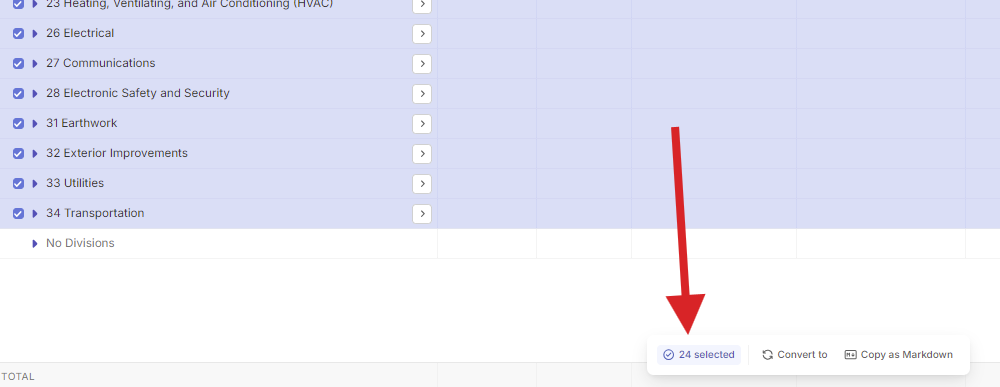
Great update all around! Is there anyway these expand/collapse buttons could be added to the pop-up menu at the bottom of views?

Could you expand this idea?

I think this is the best release in like 6 months, haha. Favorite things are being able to resize cards on a whiteboards and finally being able to expand/collapse all entities in a list. :grinning_face:

For whiteboard card resizing:

  • Could you also add an option to have the text/fields inside the card scale 1:1 with the dimensions of card?
  • Is being able to set the background and border colors of a card something that’s in the backlog?
  • I’d also love to have options on how the text/fields in a card are aligned inside the card (top/center/bottom & left/center/bottom)

For expand/collapse all:

  • If I right click an entity and click “expand all”, I feel like it should only expand all the levels below the level that was clicked and only within the entity that was clicked, instead of literally every single level in every single entity. It feels a little confusing to control the expansion of all entities from “within” a single entity, because the other options in that menu only apply to the entities you actually selected and clicked on.
  • Similarly it feels a little unintuitive to have to make 2 clicks to expand/collapse everything. Could you add an icon (perhaps it pops up to the right of the level arrow when you mouse over it?) to be able to handle this with a single click? Or maybe if the level arrow was double clicked, it would expand/collapse all, but a single click would keep the behavior exactly as it is now where it only expands the next level?
2 Likes

Sorry, I am not sure the proper name. See screenshot below for the pop-up menu I am talking about. I was thinking that more of my coworkers would use this feature if it was right in front of their face rather than hidden. But now that I am playing with this feature more, I’m realizing it’s an all or nothing. You can’t select a few options and only expand/collapse those, it’s the entire view. So with that in mind, it probably doesn’t make sense to include in the pop-up menu since that is for only manipulating the selected items.

1 Like

Yep, this is what my feedback above relates too as well.

  1. Most users won’t know you can do this if it’s not visually front and center instead of hidden behind 2 clicks.
  2. Sometimes the user might want to only expand all levels in specific entities, instead of all entities.
1 Like

This behavior is already implemented for scale, but if you resize the card horizontally, the text fields adjust to the new width of the card

we will add the ability to set the card type color just like on the other views

We have this idea, but we haven’t planned to implement it yet, might start by adding only element wrapping

Oh perfect, I just watched your video and haven’t tried it myself yet so thanks for clarifying.

Awesome, would be very excited for these features/ideas to come to life to allow for much more “presentation-like” layout options.

I often want to visually show entity relationships as smaller child cards nested inside of a larger parent cards, but it’s very hard to do that well without alignment or color options.

We explored other tools and did not find tools which added explicit icon on a visible place, so decide to not expose it so much.

interr0bangr:

Similarly it feels a little unintuitive to have to make 2 clicks to expand/collapse everything.

We explored other tools and did not find tools which added explicit icon on a visible place, so decide to not expose it so much.

Seconding this request – the more we ‘think like Fibery’ the more we look for similar behavior – i.e., a similar icon/button to what is on the main menu sidebar on the left of the screen. I’m super glad to have the functionality at all, and selective expanding would be nice to have but happy without. The icon would be much more important because then people don’t have to be trained on it, and it works just like the Fibery sidebar so that a consistent mentality persists across the workspace.

3 Likes

I agree with @interr0bangr, it feels unintuitive.

Gmail currently have a visible icon when a conversation contains more than 1 e-Mail :

If there’s only one e-Mail, there’s no icon :

Despite it is not the same usage/use case, when you use tools like Gmail everyday, it feels unintuitive to have to do 2 clicks for this function.

3 Likes

I’ll admit I get nervous on Thursdays lately.
Today I’m a happy camper. This release must be worth a lot of points! Mermaid, Collapse all, and N8N on the same day? :clap:t5::clap:t5::clap:t5:
Well done.

Great update and the Mermaid thing … really fast implementation… looks exactly like the version from “Mermaid live”.

btw.:
Notion rendering differs from every other app I know. Same code as the pic above.

How can we handle the missing logos/icon for this use case? Like, in the future can we use the “::icon/emote:: features?