Fibery Remote MCP Server
MCP Servers are nice, but installation was painfully hard. Now Fibery supports Remote MCP and it means you can install it easily and authenticate via OAuth. Claude (Desktop and Web, paid plans only) and Cursor are supported as MCP Clients. If you want to use Fibery MCP in some other client, let us know.

Fibery MCP server includes dozen of tools with the full workspace schema access, advanced querying, entity manipulation, user context, and Fibery user guide search.
Check Fibery MCP Server user guide.
See Space access changes in Activity Log
Someone has lost their access to Space—but why? Previously, you used to either launch an investigation via our support, or cope with anxiety indefinitely.
Now, when someone shares a Space or changes access, you’ll see it in Activity Log:
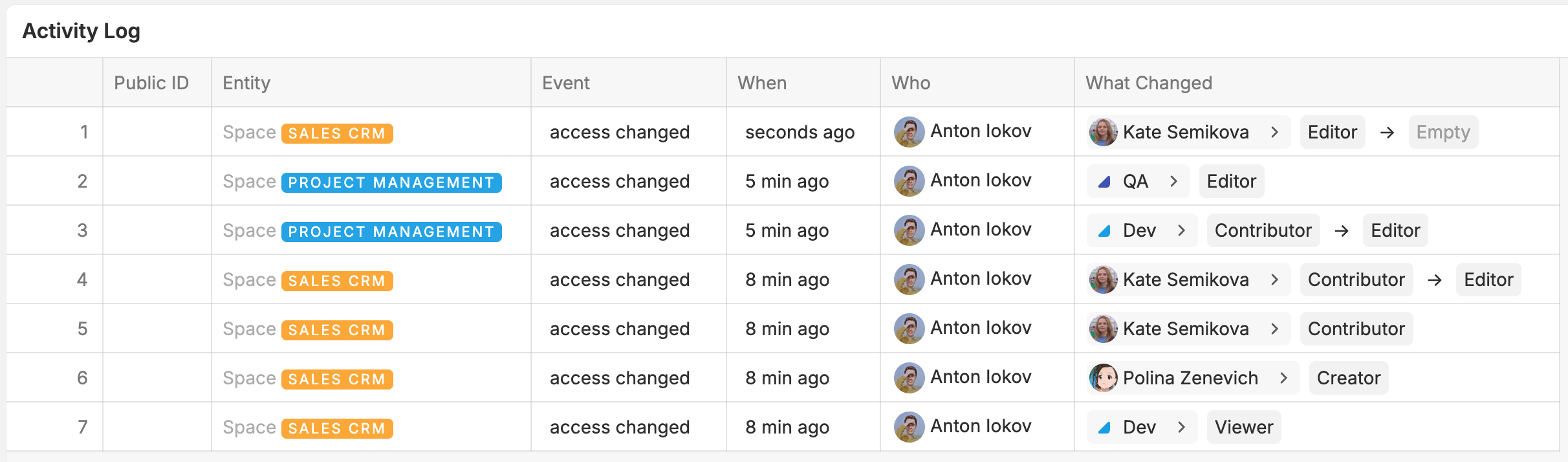
If you notice something unexpected, you can go straight to Who’s DMs and ask questions. They must have had a reason! 
Next: the same for all kinds of access changes (Database, Field, Entity, Access Template).
 Deteriorations
We’ve removed Smart Agent rules from automations so far. They were slow, caused problems to automations rules and not very consistent with the whole automations design. We will re-think them and re-add to Fibery in some future.
 Small UI improvements
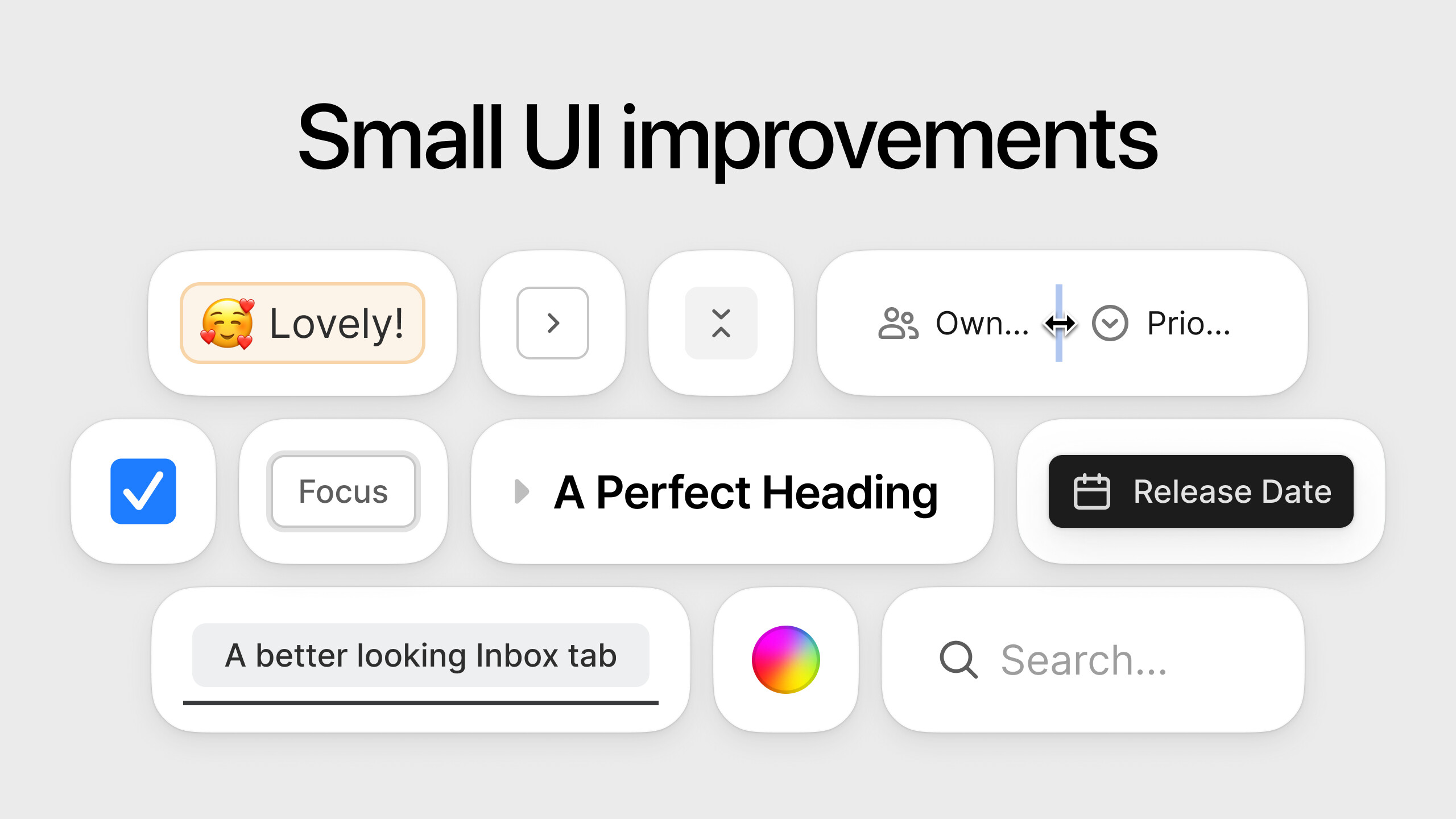
“The devil is in the details” they say… that’s what we thought when collected a list of (not-so) tiny UI improvements across Fibery. These won’t bring the revolution, but will definitely make Fibery look much more polished, refined and responsive. Some of the improvements included in today’s release are:
- Rich Text: fixed paddings and styles in Table of Contents;
- Tables: resize handles now match with others across UI; table cell headers are now truncated if don’t fit; drag handles increased in size; name of the Entity is now shown instead of
1 Itemduring reorder; open entity button>corner radius has been fixed; - Views: fixed size and positioning of
Search in Viewinput; fixed various button sizes and positioning; updated some copy of menus; fixed breadcrumb text styles and opacity; fixed buttons focus ring visibility; - Board View: Wide
+ Newcolumn is replaced with a very narrow+column, so you have more space for the Board View content. - Entity View: Improve collapsed Field visualization on Entity View. Many users struggled to notice when some top fields are is collapsed on when some rich text field is collapsed. In this release we’ve made an attempt to fix this problem. Now collapsed state is more visible in both places.
- Other improvements: fixed badge text vertical alignment on Windows; replaced collapser components to new ones on Entity View; updated Tab component in Inbox and Comments; updated Color picker components; fixed Checkbox styles for unselected state; fixed color coding styles for Units used in Select/Multi-select Fields and across Views; updated
Nothing foundtext styles in Sidebar; updated Tooltips and removed unnecessary Unit previews;
This is the first batch we are delivering today, more improvements to come 
 Improvements
- Webhooks: Retry attempts increased from several minutes to 3 hours. In case of failure Fibery will send a notification to all admins
- Whiteboard: Hide section name badge if user deletes name completely
- Timeline View: Secondary dates are visible even if primary dates are not set
- Sharing: when managing access for a User, see all Spaces they have access to, including those shared via User Groups
- Home Page: Shared with Me and Watchlist widgets added to Home page
 Fixed Bugs
- Gantt View:
- Highlight item in left column if it’s open in a panel
- Dates don’t get select automatically when create relation Gantt/Timeline
- Timeline View:
- Timeline performance improvements
- Sticky title glitches
- Secondary date borders don’t display if primary range overlap secondary range and the entity is in selected state
- Drag’n’drop experience is different for items in backlog
- Permissions: User can Share only 1 item at the same time
- AI Agent Build mode:
- Create/Update Views with AI: “Is empty” filter doesn’t display on the view created with AI
- Create/Update Views with AI: AI can’t add columns/rows to the board view
- Create/Update Views with AI: AI can’t show avatar field as unit on views
- AI can’t create workflow field when create Space
- Email Integration:
- Email Send: Plain text is not parsed to html which results in unformatted text
- Email sync removes strikethrough text
- Smart Folders & Context empire: Just added child entity does not appear in smart folder unless page is refreshed
- Hierarchical List: It’s possible to add same database sometimes to List view/Smart folder config and it does not work
- Whiteboard:
- Tune text visibility based on zoom level
- Whiteboard comments: navigation to thread anchor doesn’t place anchor at screen center
- Documents / Rich Text: It’s impossible to convert checkbox to bullet or ordered list item
- Filters: ‘Invalid time value’ error when user enters too large value for Date field filter


