August 21, 2025 / 🌽 Some UI, AI Agent and permissions improvements

Show nice links to Fibery objects in AI Agent replies

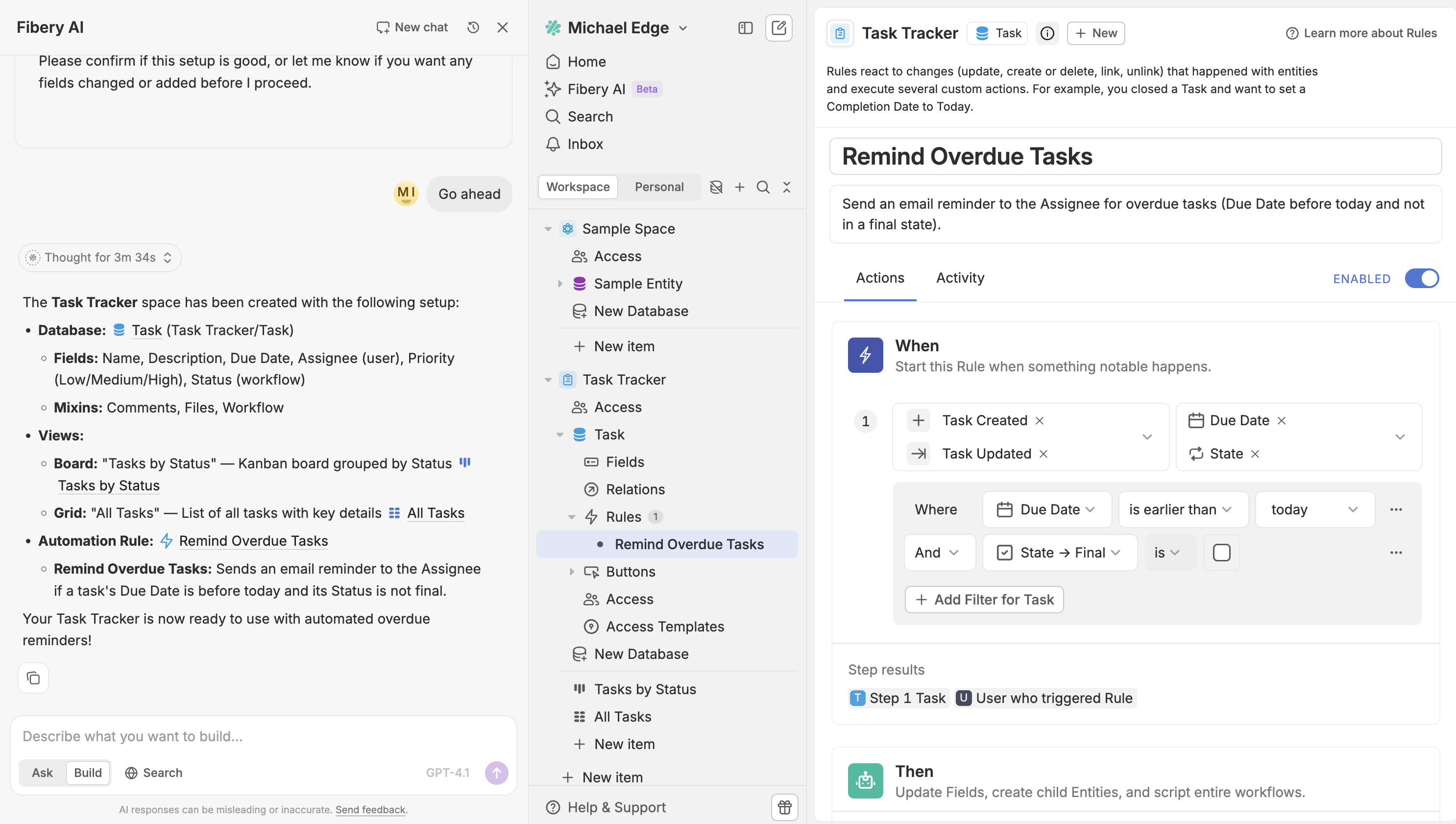
AI Agent now generates nice links to Spaces, Databases, Views, Fields, Rules, Buttons and Entities. It is especially useful in Build mode when AI Agent creates something, so you can quickly navigate, check the result and correct it.
Revoke automatic access via Created By in automations

It’s almost always desirable for the person who has just created an entity to be able to update or delete it—even just to correct a typo or undo a misclick. That’s why we recommend to turn the Editor automatic access via Created By field on by default for all Databases.

The problem is that it’s sometimes not desirable for this author access to be permanent. If someone created an entity two years ago and they don’t have any other access to it, they likely shouldn’t be able to edit.

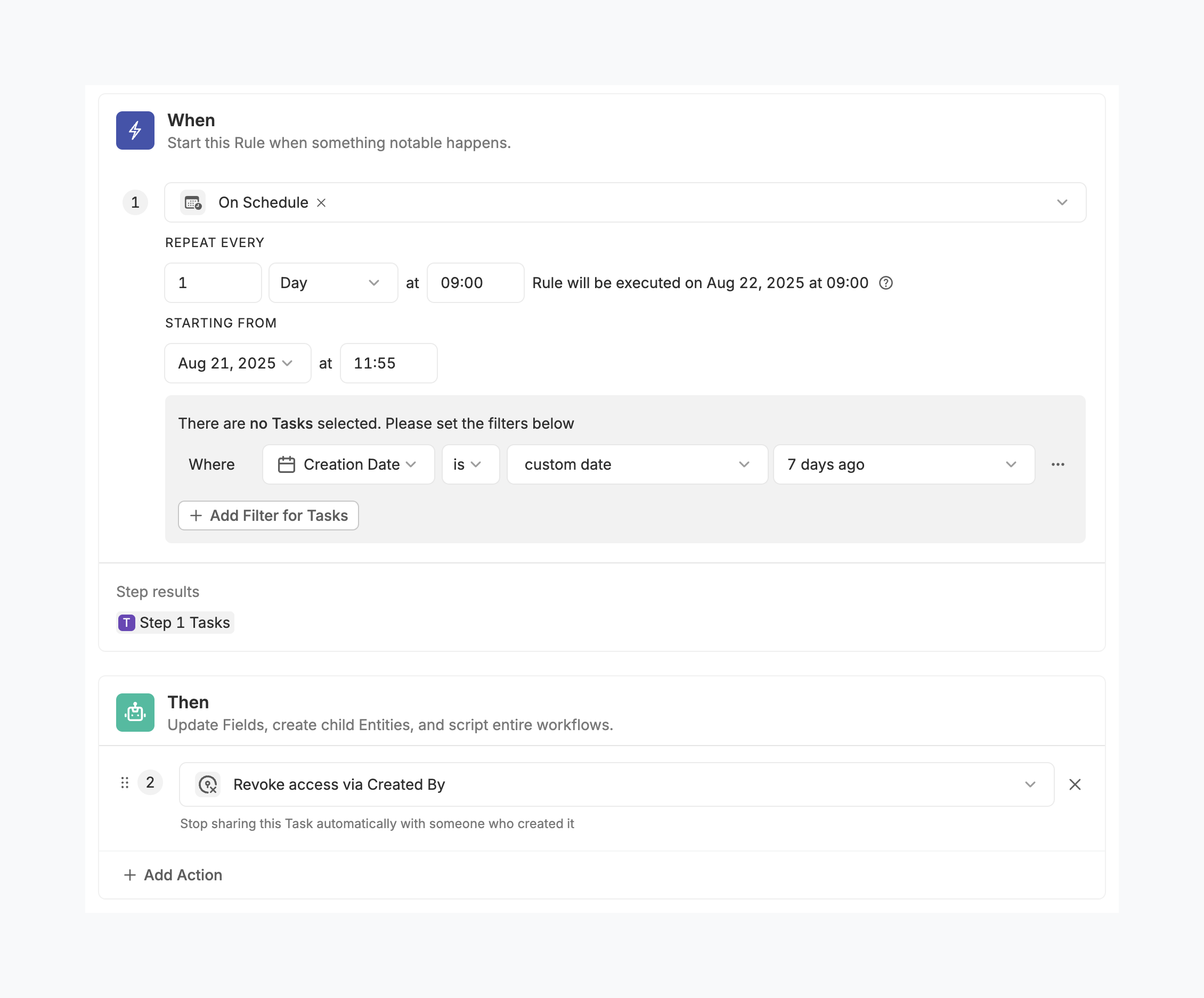
Luckily, the access via Created By is revokable. However, it’s just not feasible to revoke it manually for hundreds of entities. That’s why we’ve introduced a new automation action:
So this would be our advice:

  1. Turn the automatic access via Created By field on, especially if you have Submitters in a Database.
  2. If people who create entities shouldn’t have this access forever, configure a scheduled Rule to revoke it (see the screenshot above).

If this setup proves to be practical, it’ll become an out-of-the-box deafult.

Small UI improvements: Batch 3

This week we are bringing UI improvements and updates to modal windows, entity page headers, some types of clickable Units, tooltips and quick filters.

Modals, Units, Filters and Entity headers

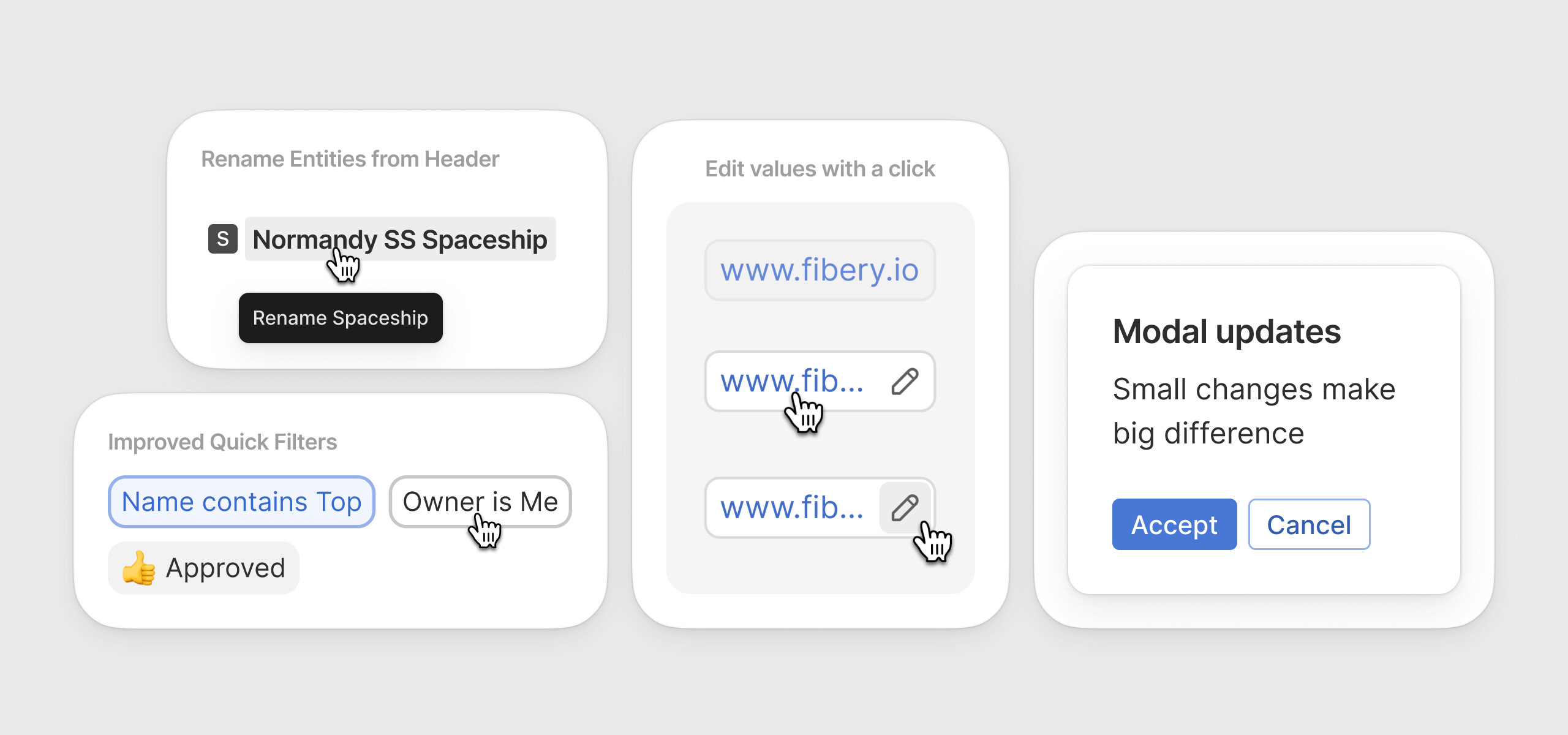
We’ve refresh a look of modal windows, added ability to edit Email, URL and Phone units via single click, restyled Quick (pinned) Filters and added possibility to rename any Entity right from it’s header. Similar to renaming Views, just click the title and type a new name.
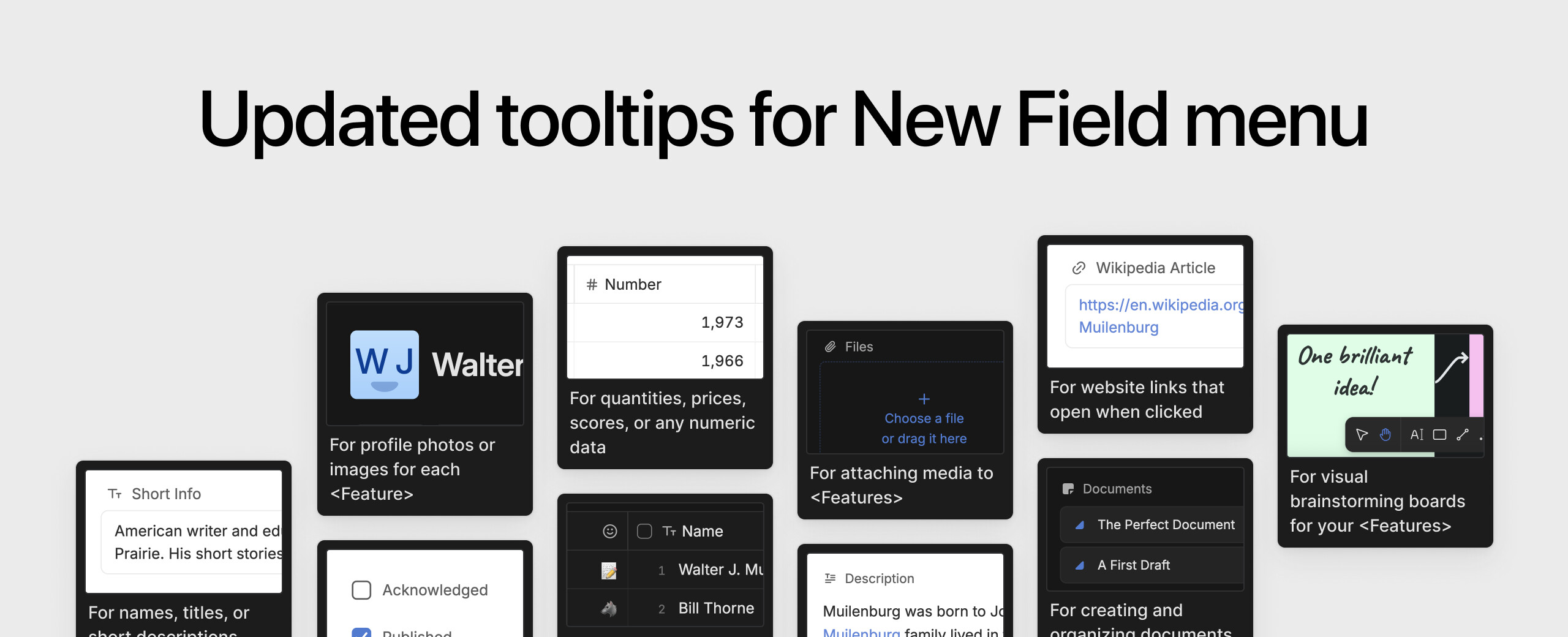
New Field tooltips

We’ve updated images and descriptions of the “New Field” menu. Now they explain each Field better and display an up-to-date UI screenshots (some of which were very much outdated). Moreover, tooltip screenshots are now adapt to Light and Dark theme, isn’t it cool?
:butterfly: Improvements

  • Integrations: We’ve added a date of account creation, so it is clear which one is old and which one is new.
  • Jira integration. Now you can add JQL filter to narrow down synced databases
  • Automations: Yearly option is added to scheduled rules: On Schedule → Repeat every → … Year
  • MCP Server: Fibery MCP Server is now available in GitHub Copilot.

:shrimp: Fixed Bugs

  • Entity View: Broken comment markup in activity tab for an Entity in case of columns
  • CSV import: Date time is always suggested for Date fields ( without time)
  • Automations:
    • Empty account name in Automation action: Gitlab accounts list
    • Scripts: getting error when creating an Entity with required Single Select
  • Gantt View:
      • button doesn’t display when hover on “No Database” item
      • button is hidden if child entity title does’t match the sidebar width
    • Error when drag&drop child entity to “No Database” section on Gantt in case of many-to-many relation
  • Whiteboard: Empty section name does not get saved
  • History & Audit Log: Non-Admin can’t see access changed records in Activity log
  • Dashboard View: Extending the editor’s exception to dashboards, that is give edit permission to editors for dashboards
  • Permissions:
    • It’s impossible to distinguish Databases with identical names in DB access audit
    • Explanation lacking for Member downgraded to Observer
    • Indirect Database access is missing for User Groups
    • Database Permissions: Cant select users db in second + level view config dropdowns
  • Fields:
    • Restrict ‘Required’ option for Single Select fields
    • The url field should have max width defined
    • Label text is cut at the bottom in OE field selector
  • MCP Server: MCP server does not allow boolean values for query params
  • AI Agents: Users unable to use agent when dynamic example generation fails

P.S. Enjoy the last days of summer and smile at strangers :zany_face:

9 Likes

Great batch of improvements!!
Especially AI links, the Created by revocation automation step, Yearly
scheduled automation, and UI improvements.

One request while we’re on GUI with quick filters would be the ability
to set certain filters as ‘toggles’ – i.e., if I set a group of toggled
filters, if one turns on, the other turns off. This performs the same
function as a tabbed view. For example, if I have a list of projects,
and I have "AND"ed quick filters set for Active vs Future (unscheduled),
I may want neither filter or either filter, but both filters is
meaningless (it’s mutually exclusive so it filters everything out). It
would be nice to be able to group these as a toggle group, and then if I
click on “Active” it clears “Future” and vice versa. Right now, I have
to double click – once to select Active, once to select Future.
It’s not terrible once you know what to do, but it is a nightmare to try
to train users on, especially because they may not understand whether a
certain filter is “AND” or “OR” – it would be much better for users if
we could just set the behavior to make sense and they don’t have to
think about it.

3 Likes

Lovely update! I have some thoughts though…

  1. New Pinned Filters design look disabled. Maybe it’s just me, but the background color of the pinned filters is now the same background color as cells/fields that are read only and not clickable. It makes me feel like the pinned filter is disabled.

  2. I don’t understand what the purpose of the new feature of revoking access is. What is the advantage of this over an extra field called “Share with” and an automation that that set the “Share with” when someone submits, then you can just clear that field or unlink the submitter after a certain amount of time? Am I missing something? Or even a formula that pulls from the Created By, and checks the day or other conditions if they should have access or not, then share using the formula field.

In the long term, I think we will enable automatic sharing with Created By by default. At the moment users need to remember to set it up.
When it becomes default, a minority of users will want to turn it off. Having a simple way to do that automatically makes sense.

1 Like

Thanks for you feedback, Ron!
We use grey backgrounds not only for disabled or read-only elements. They are, for example, used in Custom access templates (access buttons), or in Settings → Preferences → Weekend days.

If the confusion occurs for more users, we may reconsider and restyle it

1 Like

By default with a way to disable on the database level? Or default and can’t be turned off? If its default and can be turned off, then still my point above stands, you can then make a new formula field with the conditions to share it, and move the automatic sharing to there. Default is assuming they will always need access, and if there are conditions, you can make a new field with those conditions / automation runs.

When a database is first created, the access level for Created By will be set to Owner, which is what most people probably expect (“If I can create something, I should be able to edit it”). If a db creator doesn’t want this at all, they can change it (e.g. to Viewer or No access) at the db level. If they do so, Submitters can create things, but not see/edit things.

But sometimes, a more obscure use case is needed - maybe people should be allowed to make edits for the the first day after creating (e.g. to fix typos), or maybe some specific people should not have Owner rights to things they’ve created. The ability to revoke access for certain people at certain times could be useful.

You’re right that these use cases could probably be solved currently, with extra fields, automation rules, etc. but we’re trying to make things work simply for the most typical situations, and then only requiring nerdy fiddling for the corner cases.

1 Like

I see, makes sense.

I just worry that this encouraging use in a less-than-ideal way that Fibery can already do very elegantly.

For example. Using the Revoke Access, I can no longer see a view with the list of entities and see who has access to what. “Auto entity access”, i think, is so popular because partly because it makes this possible. Also, there’s no way to Grant access back again, if something becomes relevant again.

I think if you’re running automations to Revoke access, you should already have the Fibery knowledge to make a new field, an automation to populate on creation, and make another automation to clear that field.

Idk, this feels finicky for no good reason. Doesn’t make it so much simpler (imo), and encourages bad practice.

I’d even argue towards not making default, so that the admin/creators know and understand what is happening. They know there is the option to turn it off and turn it on another field. It’s a learning opportunity for the users.

Can’t you see this from either direction, e.g. on an entity:


or on a user:

We’re not expecting a lot of people will need to use it.
The point is, the most common use case should not require any special effort, but this function will be useful for the less common use cases.

We probably disagree here. Most new Fibery users want simple functionality without needing to learn too much to begin with. Over time, they will learn of course, but default access via Created By seems like the expected behaviour for most new users. This functionality is the escape hatch they can learn to use, if/when needed.

Yes, but not as a view with the person that has access in a field. Or grouped be person’s access. It’s objectively worse like this in terms of data structure.

When you say “this function”, I assume you mean the more complex way i’m recommending? The problem is that like this there’s also no way to migrate from one to the other. If I used automations to revoke access, and now want to make a new field with everyone who has access, I can’t pull the actual access data from the entities. (Maybe via api? not sure).

I do agree with this. But I also think a few things:

  1. The only time this is needed is when someone has access to a database as a Submitter.
  2. If you’re doing database sharing (and not just Space sharing), that means you’re dealing with more complex access and SHOULD learn how to do things right to not give access to things where there shouldn’t be. More access where there shouldn’t is a bigger problem than no access where should be (when it comes to security). People will ping you when they try to access something but cant. No one will ping you if they have access to something when they shouldn’t have.
  3. This makes the “Submitter” access level more complicated haha. You’ll need to write: “Can create but not view, unless you have the automatic access to those who created” as that is active by default. Someone who goes in and sets to submitter, expects at the moment that the submitters do not have access. But maybe I’m wrong and this is what you meant here:

If this is really the case, might I suggest instead of it being on by default, a little notice that shows when setting a database to “Submitter” to suggest the user turns on Automatic Access for Created By. Then you’re giving the user an opportunity to learn how things work. Fibery is complex, you need to learn how to use in order to fully utilise it and see it’s amazing value. Simplifying is important, but if you spoon feed people they wont understand how things work, they will see it as just another tool, when its not.

TLDR: This allows people to use fibery in a sub-par way, when people who are at this point (making submitter only databases) either already know enough or SHOULD know more about how access, rules, and formulas work.

I don’t want to get into a load of tech details about how access via Created By is actually different than access determined by other People fields, but suffice to say that we think this feature (having support for revoking) is necessary for the long-term benefit of the permissions model and for making life easier/simpler for most (hopefully all) users.
It might be that an alternative solution would appear more ‘elegant’ or more aligned with Fibery’s generally ‘unopinionated’ style, but I think you’ll have to trust us that it’s a step in the right direction.

People need to be spoon fed in order that they don’t starve (aka churn) before learning how to feed themselves

2 Likes

Of course, at the of the day I’m willing to bet a lot on Fibery’s success, and everything that was done to get to this point is amazing.

Sharing my thoughts when I disagree to help solidify what already exists, not expecting it to move exactly to the way I think.

Keep going you guys :heart_hands:

3 Likes

Question - do you guys incorporate references when the AI analyzes work? We have been doing some good querying about “trending’ work entities, priorities, etc. The AI delivers very good information! It seems like though it’s able to read comments and extract some conclusions, but I was wondering if you have references also factored in? My team really leverages references in Fibery - even moreso that comments. So if I had an entity that was referenced in another entity’s comments, would the AI be able to evaluate that? If you don’t have this in play I’ll create a feature request as I think it would help a ton if all the context around references was in the mix of the AI dataset. This is really the reason we use Fibery - the references feature, which continues to be basically unique to Fibery…seems closest equivalent in a non-“networked-thinking” app (by that I mean Roam, Obsidian, Tana, etc.) is still Notion, but it’s backlink feature has actually regressed, and they never implemented the game-changer of the “highlights” around references. One of the very first things Fibery released that really stood out and an absolute differentiator to this day, even though I think we still only have the first iteration and its going on 3 years maybe?

Thanks!

1 Like

@B_Sp I’d be interested in hearing more about how you are using references. To me, the backlinking seems mostly annoying. But I do love the relations (and recognize it isn’t too unique - Notion, Airtable, SmartSuite all do this).

2 Likes

Thank you for this!
I thought it would be nice to have a very clear view of which users joined when and if they’re paid or not, instead of remembering semantic references. A user timeline is the logical view to me. The date now gives us this option. Very helpful.

On a slight side note, my only feedback re the users and roles view is that there should really be no ambiguity visually as to paying and non-paying roles - I created a colour override to show paying users in red, which solves the issue for me.

Thank you for the continued updates!

1 Like

@CivicScribe88 yes it’s one of the differentiators for me of Fibery and probably why I’m here! If you use the references/highlights feature, especially using a soft return so you keep context, you can get effectively the same benefit as commenting directly in an entity, but while actually working in another entity:

Examples:

Meetings: If I create an entity as a meeting, then during the meeting go to all the other entities in Fibery that are being discussed, and note what was said and tag the meeting, the meeting entity then will have a beautiful summary auto-created, with every last detail of the meeting and what was discussed. There is no need to click around.

Updating a project and its task simultaneously:

If I have a project/task hierarchy, and I update the task, and then tag the project saying “this is also the most current update in this project” - the project will pick up the update in its references section, and without looking at that task’s comments I can read that the project is updated too, and what the update is

I am in a task related to a supplier I use. I update the task and tag the supplier - now on the Supplier’s entity, the entire context of what I did with that task will show - not just the link to the task entity. This gives me the chance at a glance to see what was done with the supplier without having to click back to the task.

The other tools you mention have simple backlinks, which are actually in a lot of places, but those are very limited - you don’t see any context of why the one entity is mentioned in the other, so it requires a lot more overhead to piece together the flow around the link.

A few tweaks w/in Fibery would really make this feature extra-effective, such as For Activity Stream, ability to see in chronological order References & Comments. Right now my team is trained to look in both comments and references areas to see updates, but they have to on their own look carefully to see which is the more recent update.

Hope that’s useful!

2 Likes

@B_Sp thank you for this! I’m going to play around with references some this next week!

I have a database called “updates” And we use it a lot like you are describing. It’s really great because I can relate it to the task database, then roll it up (look it up) in the Projects database (I think I use a formula actually to achieve this). But, as you note, these things don’t get sorted chronologically. And there appears to be no way to do it. So it’s…. Very confusing sometimes.

Thanks again!

2 Likes

Feedback #1:

First, I want to say that the recent UI improvements have made Fibery much more enjoyable to use on a daily basis. Great work!

Feedback #2:

However, I do have some concerns about the restyled Quick Filters. The larger border radius and the default gray background make the filters appear as if they are already active, which can be confusing. Additionally, the hover and active states don’t feel as intuitive or visually distinct as the rest of the UI updates.

Maybe consider adjusting something here?

Thanks again for all the improvements!

2 Likes

Ok great, glad that made sense. Yes would love to get more support for references and comments being viewed similarly - we use them in unison in such a way that it is really hard to imagine how to track various work across disperse teams and functions anyway nearly as effectively.