Today’s release contains two dozens features from various areas, so anyone will find something to enjoy (we hope)! Our small AI team was especially productive recently (maybe because they know how to use AI tools better  ).
).
 Fibery AI Context
Working with AI in Fibery used to mean typing everything into a blank chat and hoping the assistant guessed what you were talking about. You had to remember exact names of Databases, Views, Rules, and Reports, and then carefully describe them in text.
Now you can set explicit context for the AI Agent using actual Fibery objects: Databases, Views, Documents. The agent sees the same objects you’re looking at and can reason about them directly.
This makes it much easier to:
- Configure and iterate on Databases
- Build and refine Reports
- Adjust Views and their settings
- Work with entities and documents
How you can set context
We support several ways to attach context to the AI Agent:
- Manual selection in the AI chat
Use @ context picker in the AI panel to add Databases, Views, and Entities. - Automatic context from the open panel
When you open the AI Agent from a specific panel, that panel’s object becomes the initial context. Example: you’re on the “All Tasks” view → open AI → the agent starts with[All Tasks]as context.
Coming soon: more context types, including Space, Formula Field, Automation Rule, collections of entities, and selected text inside rich text fields.
 Create and Update Reports with AI
Reports can be tricky to set up, especially when you need custom calculations. Now you can create and iterate on Reports with Fibery AI. Create a new report, set it into the context and iterate till it is good enough.
NOTE: Fibery AI does not support history/cumulative reports yet.
 Fibery AI can access entities’ change history
Fibery AI Agent now sees entities’ change history and can use it to answer questions and generate quite interesting historical reports. You can ask AI to review implementation flow of a specific project or a feature, or review changes for the last week in some area. Here are prompt examples:
Prompt:
I was absent last week generate me nice overview about changes in all the features for last week. I want to be informed very well about this to catch up with work. I am more interested in text and narrative description than just tables and charts. Describe every changed feature and what was changed. Separately create a section with newly added features.

Include:
- What exactly was changed and by whom narrative
- What exactly was discussed and what decisions were made related to the feature
- Include correct links to features
or
Prompt:
Write me an extensive narrative about this feature implementation timeline, use history tool to see all changes, check all comments. Highlights struggles and decisions
Try them and let us know how good (or bad) it is.
Import & integration: Allow to create missing related entities and select-field options
When importing CSVs or syncing from integrations, your source data often references related entities that don’t exist in Fibery yet (e.g. new Tasks, Tags, or other related items). Previously, such “unknown” values were ignored, which could silently drop part of your data.
We’ve fixed that. Now you can choose what happens when imported or synced relation fields contain unknown values:
- Create new entities: Fibery will automatically create missing related entities (e.g. new Tasks, Tags, etc.) and link them.
- Skip: Fibery will ignore only the unknown values, while still linking any that already exist.

Automations: Access previous fields values in trigger filters and actions (via formula)
You can now access a field’s previous value in automation rules and use it in trigger filters and actions.
What this enables? For example, different behavior for different transitions:
- Inbox → Next: don’t notify
- Done → Next: send a notification
In triggers you can can use Filters with Field Name (Previous) and in Actions you can only use Formulas so far to access previous field value.

NOTES:
- You can rely on one updated field per rule when using previous values.
 Previous values are not available in markdown templates or scripts yet.
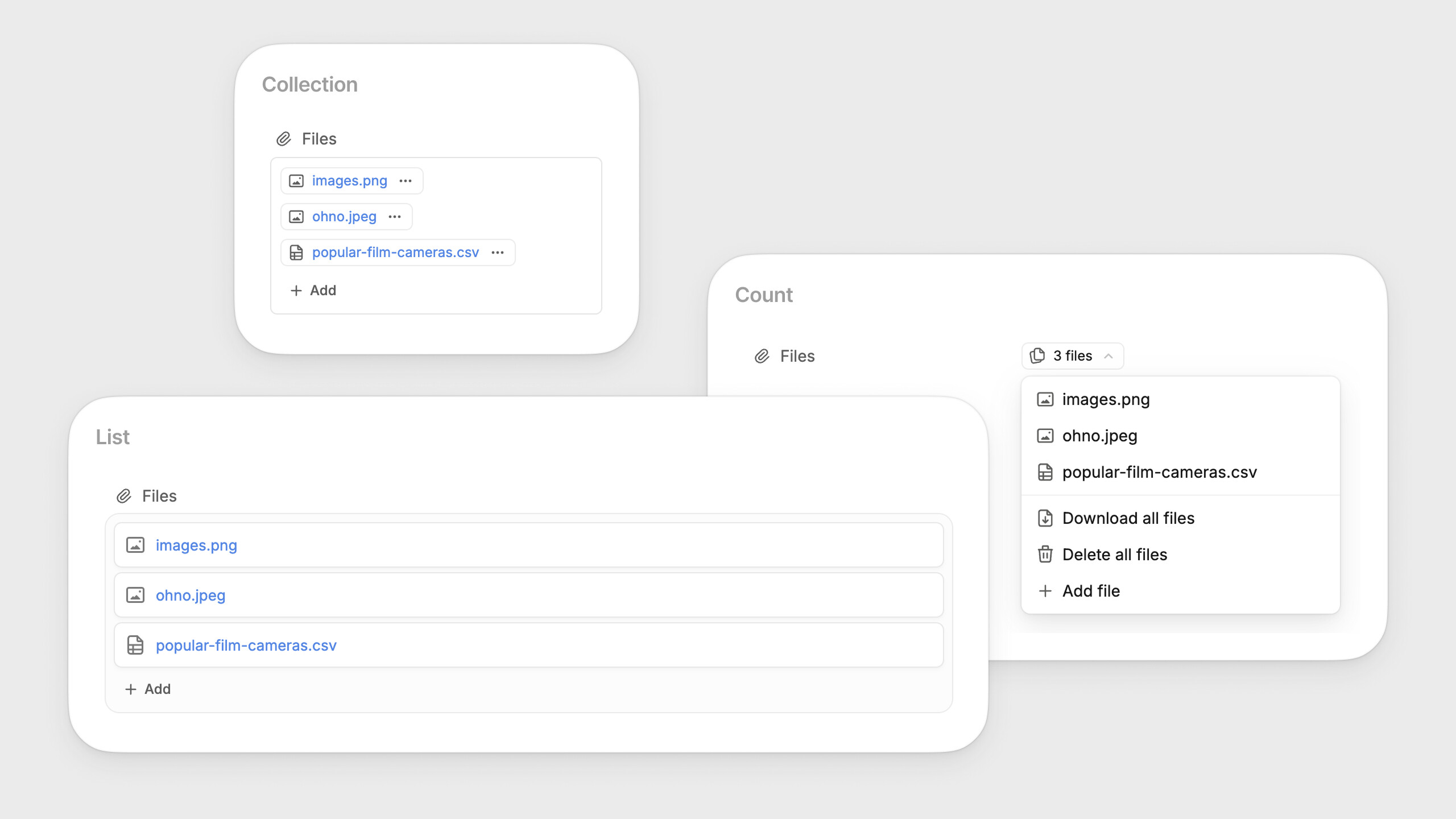
Files: More File Unit visualizations on Entity View
File Units now support more display options in the Entity View:
- List: shows files like other relation collections.
- Collection: a compact file block in the right column.
- Count: an expandable unit with the full file list, available in one-column layouts, Entity mentions, and across Views.
Whiteboard: Redesign shape toolbar
We’ve updated the shapes toolbar and improved the color and border picker, including new border styles.
You also get quick No Fill and No Border options for one-click adjustments.
Timeline View got much faster with large datasets
We’ve significantly improved Timeline performance, especially for workspaces that use it to visualize thousands of items.
- Faster navigation
- Better handling of large datasets
We tested this on a heavy real-world case:
~4,000+ features grouped by Product Area and Product Owner
On this setup, navigation performance improved by ~4.5x on an M2 Max machine with no throttling.
- Lower memory footprint
The Timeline now uses memory 2x more efficiently, which helps keep the UI responsive during long sessions and with complex views.
 Degradation
We are introducing one more API rate limit to ensure we can handle peak load:
- 3 requests per token per second
- 7 requests per workspace per second
Last week, we experienced a database-on-fire kind of day because we didn’t set the expectations of what our API can handle. With the new limit, it’s much less likely that a single customer can (accidentally) hijack the whole server’s CPUs by using a few dozen of tokens to send parallel API requests.
Requests per second is (to put it mildly) not an ideal metric, but it’s better than nothing. Eventually, we’ll introduce a more clever way to ensure we can handle your requests as fast as possible without setting our database on fire.
 Improvements
- Pinned Filters: Now you can rename Quick Filters even when the value is selectable. This helps when field names are very long or when you have two different Quick Filters with the same field name from different databases.
- Import & Integrations: You can map users via email address rather than name when importing. A new setting lets admins choose whether to map users by Name or Email. Note: this does not create new users; users must already exist in the workspace.
- AI Agent:
- Fibery AI now has a better understanding of what it can’t do. This already puts it ahead of roughly 80% of LinkedIn thought leaders.
- The AI Agent can now read the content of mentioned entities in rich text, so it can analyze documents and complex entities more accurately.
- You can now stop Fibery AI execution. This resets the chat to the last user message (partial answers are cleared).
- Webhooks. Previously, only Admins could manage webhooks. Now Space and Database Architects can do it as well.
- UI:
- The Fibery app section is now more prominent in Settings → Preferences.
- We refreshed the Form creation pop-up in Views to better explain what forms are for.
 Fixed Bugs
- Documents & Rich Text:
- Text get collapsed in both panels in case it was copy-pasted or document was duplicated
- The error in Safari 17.0 in attempt to upload image/video into the rich-text field
- Can’t submit inline comment contained only image
- Incorrect Unicode-to-Emoji Mapping for Copyright Symbol (©)
- Links to views do not work on shared pages if the link has the same domain as the shared page
- Mobile: When exporting to CSV get an error “This type of file content is not supported: blob”
- Gantt View: Gantt: can’t reorder item to the end
- Notifications: Get rid of duplicated ‘user mentioned’ notifications on entity convert
- CSV import: Import ignores existing entities when importing values into a collection field, if non-existing entities are also present
- Automations: Rule duplication: collection field in rule action is broken if database was moved to another Space
- AI Agents: Agent failed to answer after service restart
- History & Audit Log:
- Slow search by type Country on the
- Audit log does not work properly with isMe filter on the for Nikita
- History trash bin slow query by type (e.g. Country on the)
- Whiteboard: Whiteboard: unable to save as image selection if it contains a Sticky Note with avatar
- Relation Views: ‘Add entity’ does not work for the empty relation feed
- Validation Rules: Architect can’t create/update validation rule if uses enum field from the database participating in the Validation Rule
- Pinned Filters:
- Pinned filter button is active and name is incorrect for empty ‘Date is within’ filter
- Disabled pinned filter button stays visible after disabling
- Pinned reference filter input should be focused after popover open
- Show tooltips only in cases when filter description is typed
- Close button does not work in pinned filters on Mobile
- When bool filter and ‘let users change values’ is enabled then pinned toggle button does not work
- Integration Framework: “Access denied” in integration config for new integration
- Fields: Single- and multi-select option icons disappear in Field edit mode when not on hover
- Reports:
- Context reports are broken if report owner is inactive
- Creating relation report breaks object editor
P.S. Your feedback is appreciated and redirected straight to #dopamine or #cortisol channels in our internal Slack  .
.
 .
.


