Would love to have the ability to change the column width too.
I know this can be done indirectly by changing card size, but it’s still a pre-set width.
Would love to have the ability to change the column width too.
I know this can be done indirectly by changing card size, but it’s still a pre-set width.
Is there a plan to make these into separate nodes? Takes more effort to only trigger on one event. Not the end of the world I think though… Haven’t tried.
It’s definitely possible. For first release decided to implement the easiest and the most flexible node which utilizes our webhooks api. If there will be a need for more granular events, we can implement some polling-based nodes, same as we do in Zapier
Very nice!
We’re using it already to push our fireflies conversations to fibery.
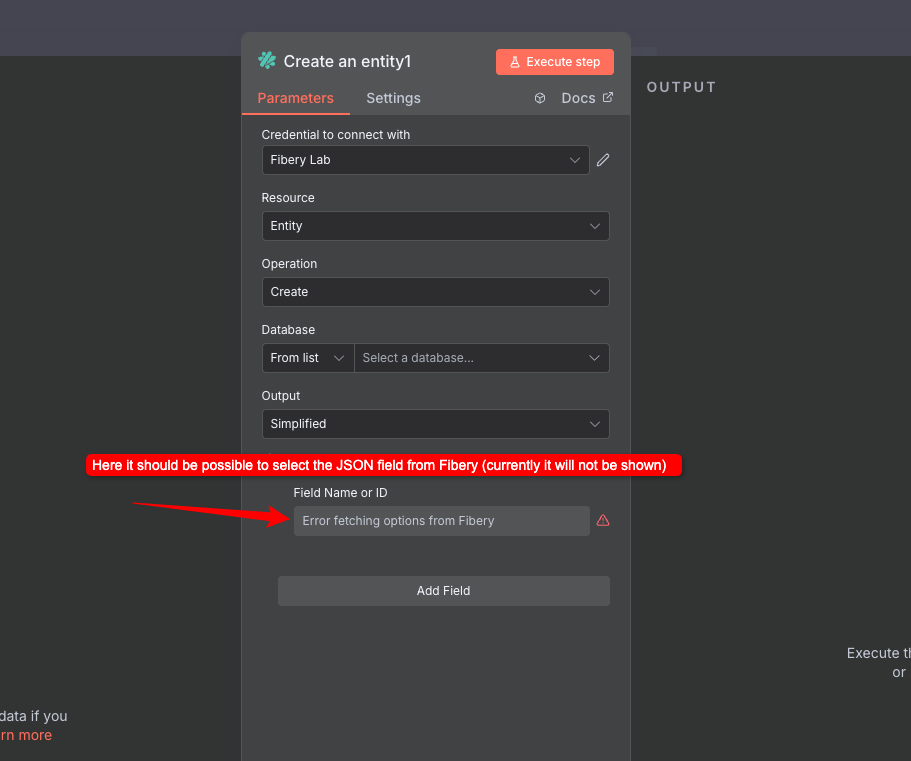
Would be glad if you can add the json field type to the entity update/creation as you can add it in fibery as field 
how do you want to use json field in Fibery?
Hey, thanks for reply!
currently you can’t select the json fields so far. It would be really nice if i we can, the value must then either a JSON.stringify() representation or an array/object. Since it’s javascript it should work i think.
Well, JSON field in Fibery is kinda hidden and not officially supported What for you use it in Fibery?
6 posts were split to a new topic: New Field Type: JSON
super excited about the N8N integration and the sharing improvements!
Hi everybody, first of all im very excited about this N8N integration, I’ve been waiting for this a lot, so cheers and thanks to all who are working on this.
I have a question regarding the usage of the update entity action.
I select the the database, I pass the UUID of the entity, but no configurable or mapeable inputs for updating the entity are shown in the UI, it just let me choose the “Output fields” that are shown when the node is executed.
Does anybody knows what I’m doing wrong?
I’m running package version v0.1.13
Thanks!
Have you tried clicking the Add field button?
Yep, Chris is correct.
Please use “Add field” to construct the entity input
Thanks guys for your replies, yes I confirm that the Add field button is working properly now:
I had already tested yesterday and the “Value” input wasn’t being displayed and the workflow failed. Not sure why, maybe with v0.1.13 that was fixed.
Thanks again
yeah, there was a bug with number inputs…
It was marked [beta] for a reason 
Please let me know if you face more issues
Sure, thanks again and congrats about this huge work. I will keep you posted if I face another issue, is this the right place to post them?
Better to create a separate topic or drop a message to support from inside the Fibery.
I’m building some stuff on Fibery and I was thinking about this UX. I really would like to see such a design in Fibery. It’s like you said: a mix between Table and List view (also similar to Board if you configure it only with Rows, in my opinion). Sometimes I’m looking for the best View to represent my data but I’m never 100% satisfied.
Table is great because we can see the Column Names. But it is not the nicest option when you need to reduce the column width while keeping the field name visible (if the content is shorter than the field name). Also, not the nicest solution when you want something clean.
Board is great for building Kanban or simple rows which shows better-ordered information, with or without column names. I mainly use the Line and Small sizes. If it were possible to show the column names on Medium size, I probably would use it too. On a Kanban configuration (Rows and Columns configured) not having the column name is great. If I configure my View with Rows only, the Medium size is not optimal because the fields display vertically, leaving the rest of the card blank. So you’re only using 10-20% of the card space, (depending on the entity’s name). It would be great to have the option for Medium and Large sizes to display all information in horizontal mode with column names. Finally, this view is not so different from the screenshot; instead of having the column names on the card, they should be at the top of the View. The separation and contrast between columns/rows is also bad when on Kanban configuration. Also, it is not possible to “Group by (recursively)”.
List is great as it is possible to "Group by” and recursively. Very useful for showing basic information in a line and on a specific order. But if I use it with “Group by”, the View becomes less appealing. On such configuration, I prefer to use the Board view. But the Board view needs improvements on contrast and colours.
Recursive nesting is possible for table views
Yes, my bad. I’m inside a Smart Folder and what I was looking for is not possible in my context.
Thanks for pointing it out.