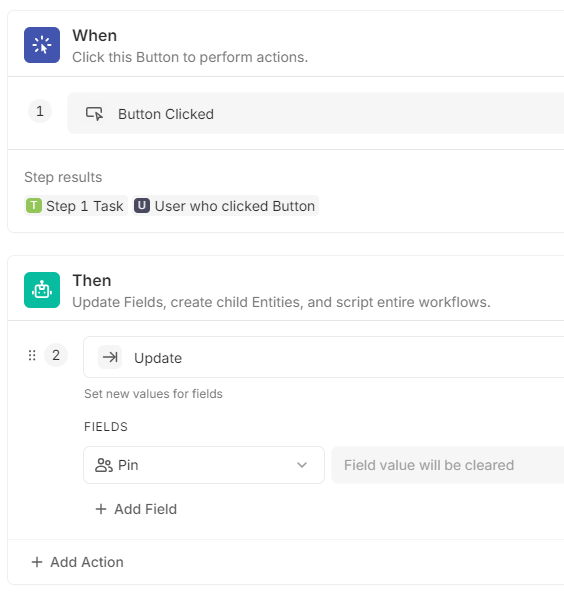
I have a colleague who loves his “Pin” checkbox on our Tasks DB. The issue is that every time he use it, the other Assignees are notified. So I’m looking for a better manner to have a checkbox for personal usage without notification.
Currently, I tried several ways but I’m always facing limitations. So my last chance is using some code but I’m not familiar with it.
The “Pin” automation works but not the “Unpin” as I cannot remove only the User who clicked on the button from the People field.
Out of curiosity, what is the eventual goal with this?
When someone chooses to add/remove themselves to/from the Pin list, what are the downstream effects you are aiming for?
You probably don’t want to use the “Update Fields” action, and use the “Link” (In this case, “Assign People”) action to link the user. Update overwrites and doesn’t add the user.
The Unlink action (Unassign) is much worse than the Linking action. See here: Unlink Automations to Reference Earlier Steps. Instead, you could update field and use a formula. Something like this: [Step 1 Database].Pin.Filter([Public Id] != [User who clicked Button].[Public Id])
I think @RonMakesSystems and I assumed that Pin was a collection of Users (representing all users who had pressed the ‘Pin’ button). If not, what is it?
Ok… I found the issue. There is a bug on Fibery when importing templates.
At the beginning we created come Spaces for different Users and on several of this Spaces, we imported the Project Management template. It seems that Fibery doesn’t rename the DB names if one already exists with the same name when importing a template. So on my User Fields, there were several relations to different Tasks DB’s with the same name ! When I copied your formula to my field Tasks Joined, it pointed out to the wrong Task DB.
I renamed all the Tasks relations to clearly identify which Task DB I was using on my formula and now it works !!
Many thanks for your help, I learned something today !