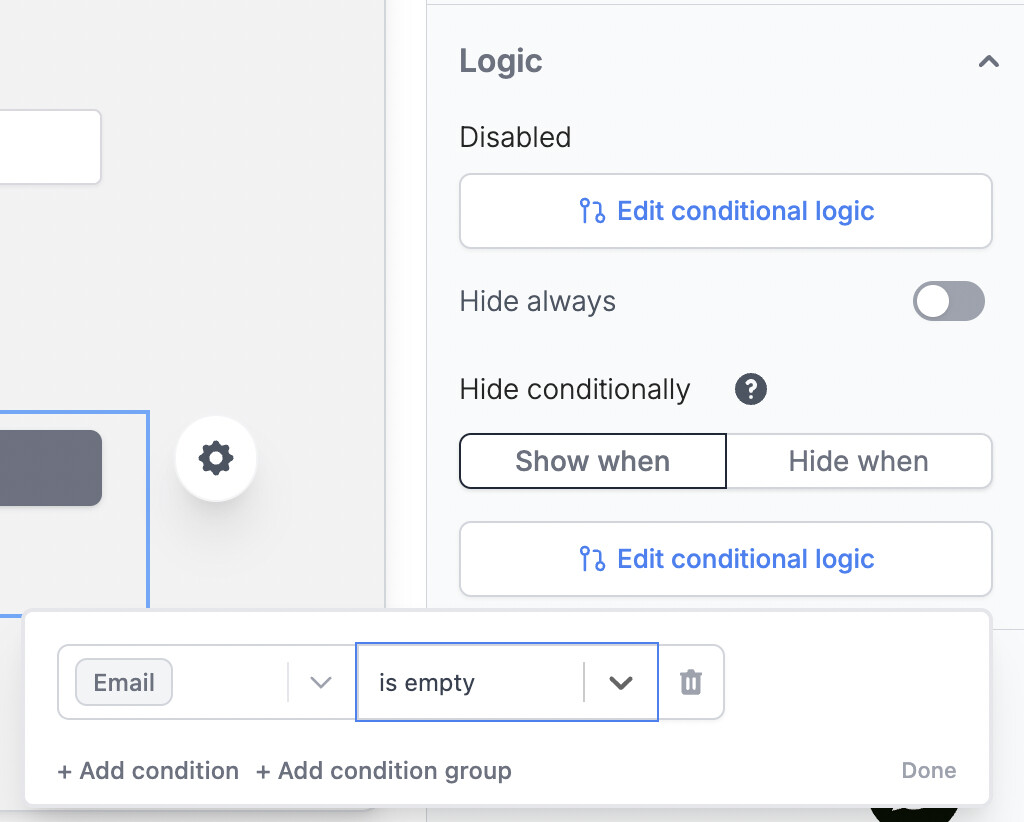
It should be possible to add conditions in Buttons (like in Rules).
There is no possibility to add a condition when programming a button… or did I miss something?
For instance, I have a 1to1 relation (Sale Opportunity – Feasability Study). When using the button, I want to create a “Feasability Study”. But if it is already created, the button should do nothing (or, better, be unclickable but that’s not the point here).
The only way to do that is through a script. But since everything is already in place for Rules, why is it not available for Buttons?
Hi, waiting for an implementation of Conditional Fields, there is a special case related to buttons: having a button appear on every entity of a database can be troublesome for data integrity, since the user can invoke its action on entities where it should not be done.
Current button definition does not include setting a condition to activate/show the button, so it seems that currently there is no way of preventing this risk, unless defining multiple views of the same database where the button field appears (for entities in a compatible state) and another view without the field button (for entities in a non compatible state with the button), but it’s not a solution especially when having multiple buttons so we should create as many views as many combinations of buttons states.
What do you think?
Cheers
I feel like this is actually a major workflow/data accuracy concern. Example: when hiring I have a reject candidate button. However, I do not want anyone to be able to click this button if a candidate is in the status “Hired.”
The button shouldn’t be hidden, but deactivated based on conditions. Or, using the current automation builder, I could filter out the entity from reaching the action steps if the filters exist for buttons.
Just bumping this, as I would also like to have a conditional check in my button and only execute certain actions if certain conditions (e.g. state is Ready) are met.
I have a Log Time button. I want reduce amount of fields a user to interact with to the bare minimum. If Assignee is stated, the rule would simply save them into the time log record without the need to select from the list of people which I might not be willing to show to the person logging in their time. If the assignee is not stated, the button should either be invisible or disabled.
There are so many situations I don’t want a user to take an action if conditions aren’t met e.g. if fields are empty, or a certain value, or assigned to someone else.
It would would also significantly improve the ability to build Forms.
The best implementation I’ve seen is with Fillout where they have the conditional logic on both the button being disabled and for its visibility (hide/show).
Its so easy and works exactly the same way as defining filters
Same concept as field validation, but on buttons. Allow certain people to press buttons and disallow others. Or only allow button press on a specific state.
It can be fixed by converting buttons to checkboxes and running it as automations, but sometimes buttons are better suited.
I think now if they added the conditional enable/disable logic to button then combined with the new Validation Rules we could build everything?
For example, button is disabled if the State is finished. This is visual and and has tooltip for what is wrong. Users then can’t click the button and wonder why it didn’t work.
Then when the button is active, add a rule based on the button being pressed for example, “User Who Triggered is member of User Group". This seems like the thing as the field change triggers but triggered on button click. It can be a new section “Button Validation Rules” below the Button action configurations.

 but would allow so much customization and improve UX