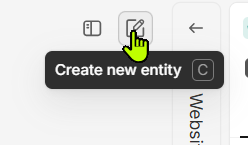
Allow workspace setting for programming of “Create new entity” multiple keyboard shortcut (multiple databases)
Issue
Creating a new entity using key C requires often an extra selection of target database and a click, which is a lot of overhead for content creators, is my experience.
Solution
Allow in Fibery settings the “Create new entity” keyboard shortcut to allow multiple user defined custom shortcuts for different databases.
E.g.
Ctrl-Shift P = New Project
Ctrl-Shift T = New Task
Ctrl-Shift M = New Message
Ctrl-Shift E = New Email
Ctrl+C is still bound to copy. It’s just C (which I dislike, because my users often think they’ve got a field selected and instead open the create modal, confused about what’s happening).
I would like for full administrator control over the button—including disabling it entirely for all users—but I think it’s way down on the devs’ list of priorities.
You are correct, my mistake and will update post, its indeed simply C and that should indeed be different, and better programmable as keyboard key as well as the actual button.
Its crazy that the create button is not visible if the sidebar is closed (I never use the sidebar, its a ux horror and i believe in no-sidebar design and navigation)
I agree, but even if we had a quick way to change the entity type via keyboard (yes, you can shift-tab up a couple times, hit space, and then browse your entities, but that’s several keystrokes)
I almost wish that the default focus after hitting C would be the entity type. Since the window just populates with (what I think is just) the most recent one you’ve created, it’s usually going to be the wrong type by default.
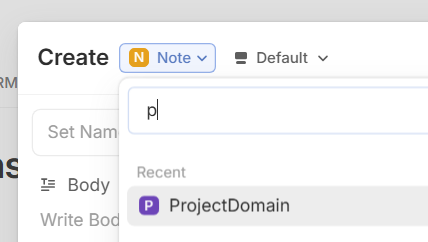
Being able to type in that field “Proj… “ to auto select “Project” for instance, would be lovely.
I think that already possible when the database dropdown is selected, you can type a letter and it suggests the database matching.
But still for me thats a lot of clicks
keyboard C
the default form shows up first, then we have to type the letter of the desired database,
then select the database since we have mutliple that start with the same letters,
What would work for me, if the databases can be “pinned” or selected as favorites, and they show up horizontally as buttons, not as a dropdown. That would reduce the amount of clicks to 2 instead of 4.
Maybe better would be to have that as database selection form in between (with buttons, not dropdown) that a user can enable as optional setting, instead of the latest entity form. This would also be 2 clicks in total.
Any dropdown is a ux tension because it has to be clicked extra to open and scrolled (two actions extra)
Thanks for the note on the typeahead nature on the Type dropdown – I’d forgotten that existed!
I’m all for any solution that doesn’t make me touch my mouse in this scenario. The quick create is triggered by a key press, and the entity name will be typed.. So any flow that makes me switch over to my mouse feels like unnecessary friction in the UX.
The idea of pinned favorite types is interesting, but would still require clicking (or many tab presses).
I feel like the best UX would be:
Hit “c”
Type “tas” in the field typeahead, “Task” is shown as the top result (for example)