Got it thank you! I was interested in styling the board view more - coloring the lanes and a darker border on cards.
Hey @Yuri_BC, it took me a while but I finally managed to find some time to implement this Fibery Tweak  I hope this works the way you imagined it, let me know! You need the newest version (1.8.0) of the Chrome Extension for this Tweak to work.
5 Likes
Awesome, works well! Thank you!
1 Like
Users can drop this it in a tweak if needed:
This is a working script that I use to redirect a list view item to a field it contains.
When to use:
For a database that functions as a redirect for many other target databases, e.g.:
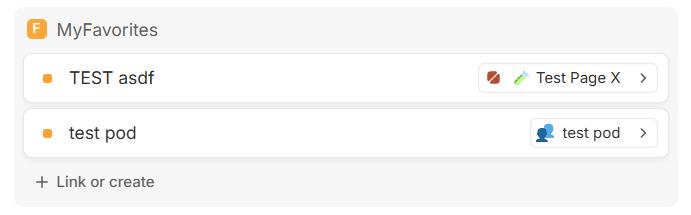
A ‘Favorite’ database, where you have a list view with Favorites. Instead of the default (open favorite entity on click) this script redirect to the entity related to the Favorite.
- [Favorite A -related to Page X] click redirects to Page X
- [Favorite B -related to Project Q] click redirects to Project Q
- [Favorite C -related to Meeting T] click redirects to Meeting T
Make sure to have ‘hide when empty’ enabled in the list view for each target relation.
The redirect is using the tiny arrow button in the field inside the list item.
You need to replace in the script the classess to match your field/items/arrowbutton.
Can be done with https://chromewebstore.google.com/detail/user-javascript-and-css/nbhcbdghjpllgmfilhnhkllmkecfmpld
Adaot and paste this into your “User JavaScript and CSS” rule for your Fibery domain.
(()=>{const ROOT='[data-rbd-draggable-id="field:e23cef20-9882-11f0-ac2f-23e40b4ebc80"].draggable_list';
const ROW='[data-react-beautiful-dnd-draggable],[data-testid^="list-card-"]';
const ARROW='button[data-id="open-entity"][kind="entity"]';
const CLS='sir-rel',INTER='a,button,[role="button"],input,textarea,select,label,[contenteditable]';

function overlayRow(r){
  if(r.querySelector('.'+CLS))return;
  const a=r.querySelector(ARROW); if(!a)return;
  if(getComputedStyle(r).position==='static') r.style.position='relative';
  const o=document.createElement('div'); o.className=CLS;
  Object.assign(o.style,{position:'absolute',inset:'0',zIndex:'999999',background:'transparent',cursor:'pointer'});
  o.onclick=e=>{
    if(e.button||e.metaKey||e.ctrlKey||e.shiftKey||e.altKey)return;
    const s=window.getSelection&&window.getSelection(); if(s&&!s.isCollapsed)return;
    o.style.pointerEvents='none'; const u=document.elementFromPoint(e.clientX,e.clientY); o.style.pointerEvents='auto';
    if(u&&u.closest(INTER))return;
    e.preventDefault(); e.stopPropagation(); e.stopImmediatePropagation();
    a.dispatchEvent(new MouseEvent('click',{bubbles:true,cancelable:true,view:window}));
  };
  r.appendChild(o);
}

function scan(root){ root.querySelectorAll(ROW).forEach(overlayRow); }

(function init(){
  const root=document.querySelector(ROOT);
  if(!root){ setTimeout(init,200); return; }
  scan(root);
  new MutationObserver(()=>scan(root)).observe(root,{childList:true,subtree:true});
})();
})();
Notes
-
Scope: The overlay is applied only inside the exact parent container provided. Nothing outside will be touched.
-
Target: It clicks your exact arrow selector
button[data-id="open-entity"][kind="entity"]. -
Safety: It lets native interactive elements inside the row (links, buttons, inputs) receive clicks normally.
1 Like