Today’s release includes a significant update to Custom Apps and many other things in different areas, including performance improvements and a lot of bug fixes. Enjoy!
Custom Apps: major platform update
We can now ship new versions of the Custom Apps platform. All new apps use the new platform. In some cases these versions are not backward compatible, so when working with an older app, you can see update platform button and the app will be rebuilt on the new platform version if you want to use its capabilities. This operation consumes tokens.
If you create apps via MCP and want to apply the new platform version to an older app, you still have to update the platform from the Fibery UI

Custom Apps improvements in this version:
- Open entities in panels, just like in the main Fibery UI.
- The rich text editor in apps now renders mentions of users and entities, and users can add new mentions via a basic UI.
- You can now change the URL of a custom app — find the
App URLaction at the top of the app. - Custom Apps can now refresh data in the background.
- The prompt typed into the Custom App chat input is now preserved, so if you navigate away and come back, your precious text will still be there.
- You can now paste images from the clipboard into the App builder.
Set a load limit for Lists and Tables on Entity View
For many years, only 15 items were shown in relation lists and tables by default. Sometimes this number is not enough, and sometimes it’s just weird. No more! You can finally set a load limit for Lists and Tables inside Entity View.
Open the Items setup section and select a Load Limit value (including Unlimited, if you’re not afraid of loading hundreds of entities every time):

Multi-window support in the desktop app
The desktop app now opens as many windows as you have screens.
How it works: Cmd + Shift + N on macOS, Ctrl + Shift + N on Windows, or File → New Window.
Each window keeps its own tabs and history, all windows share one session, and your window layout is restored on relaunch. The Windows app also gets a full app menu.
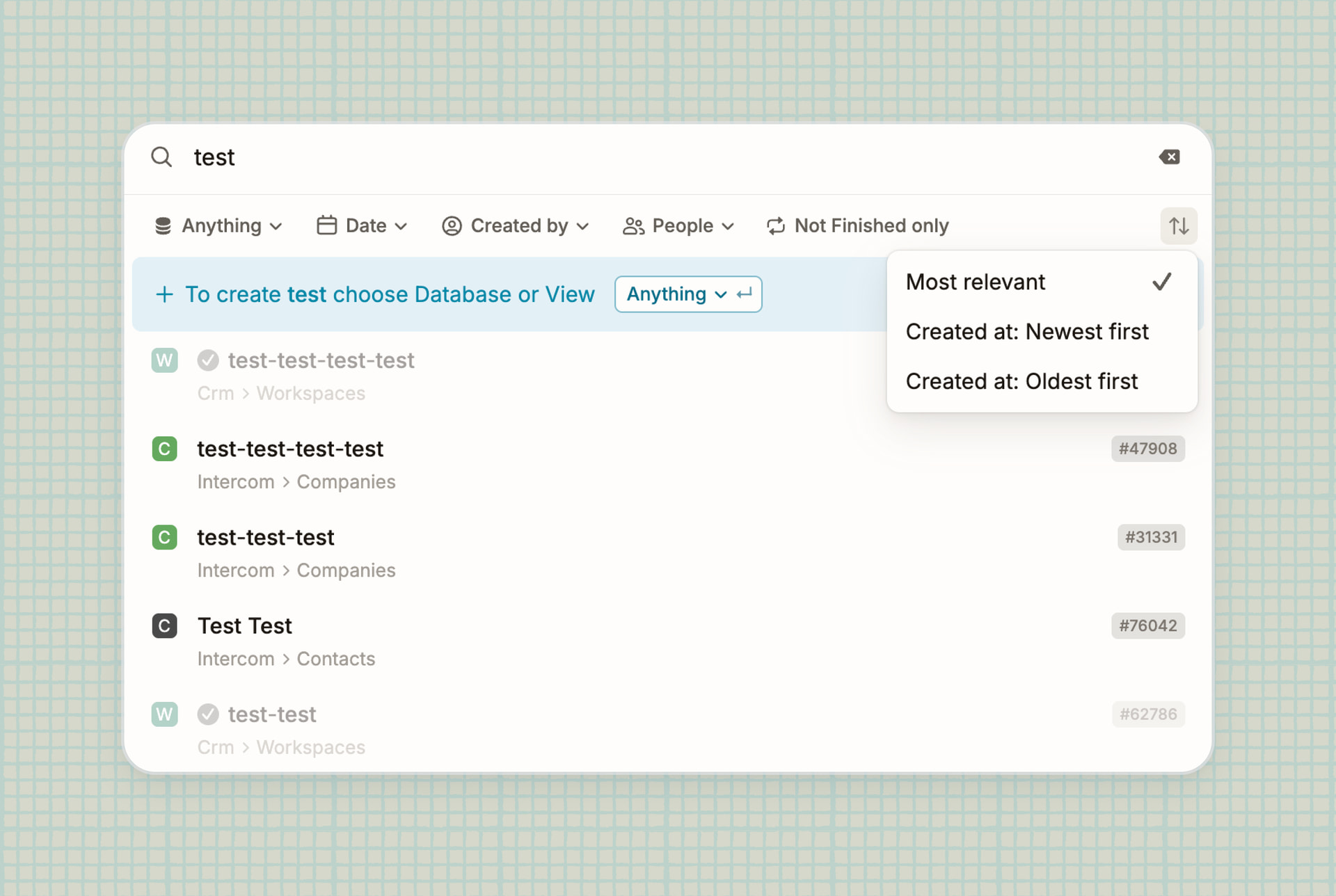
Sort search results by creation date
Search results can now be sorted by creation date. Select “Newest first” when you’re looking for something fresh.
Performance improvements
Opening an entity is faster now. Every block used to redo the same lookup on its own; now it happens once for the whole entity.
We also fixed a handful of memory leaks. Whiteboards kept their whole scene in memory after you navigated away, every popover you closed left size observers behind, and the text editor held onto handlers each time a document closed. Nothing you’d spot in ten minutes, but if you keep Fibery open all day, that’s the one you’ll feel.
Typing in documents with many mentions is smoother now.
 Improvements
- MCP: The Claude Fibery MCP Connector has been approved by Anthropic and included in the official directory → https://claude.ai/directory/fibery
- Forms: When a user has Architect mode enabled, forms open in Edit mode by default instead of Preview mode
- Automations:
- Non-Architects can now see the names of Rules when browsing history, notifications, and comments
- When a Rule adds a comment, you see its name instead of
Deleted UserorUnknown User
- Integrations: Disconnecting an integration in Fibery now notifies the connector so it can revoke the OAuth token on its end too — no more orphaned tokens lingering with the provider. Learn more here
 Fixed Bugs
- Fields:
- Unit with button visualization stops being selected after converting a field from Email/Phone/URL to Text
- Whiteboards field briefly appears on the left when added after Documents
- Form View:
- Keyboard navigation in relation selects in forms doesn’t work
- Tab navigation doesn’t work in forms that contain at least one rich text field
- Extra success messages are displayed when an entity is added via a required form
- History & Audit Log:
- ‘Via’ is empty if the rule is disabled automatically
- Empty ‘Via’ value when a revision is restored for a button/rule
- Whiteboard:
- Links and entities in an embedded view are not clickable in lock and presentation modes
- Note doesn’t have an icon in search results
- Canvas doesn’t resize when the sidebar is collapsed or dragged
- Image export glitches (text, section header)
- Text of enum items is not visible on the Entity card
- Connector highlight doesn’t appear for the target icon when drawing an arrow
- ‘Show as a widget’ shouldn’t be available for entity views
- Table View: Can’t open an entity from the ‘more’ list
- Entity View: Rich text of a locked entity can be edited in Feed view
- Custom Apps: Handle auth redirect in apps
- Navigation: “New Item” button is hidden for Architects at the bottom of a Space
- Integrations: n8n:
is_notfilter not working - Slack Notifications: Typo in Slack notification - ‘added’ instead of ‘removed’
- Reports: Unable to take over ownership once the entity with the master drop is deleted
- Desktop: Tab elements overlap the system window buttons on Windows
- Mobile: Inbox scroll jumps when you change scroll direction
- Relations & Links: Badge labels are misaligned on the Relations screen

 )
)
