In November we did 4 releases with total 530 value points (280 → 300 → 600 → 530 last 4 months). Releases quality and speed is decent in November, so we are back on track.

Main product areas and how they will change with time in near future. Stability!

Permissions
Adoption: entity public sharing 
We finished the entire scope of Share Entity to web via a link using access templates in November as planned.
12% of collaborative workspaces have used the new sharing already:
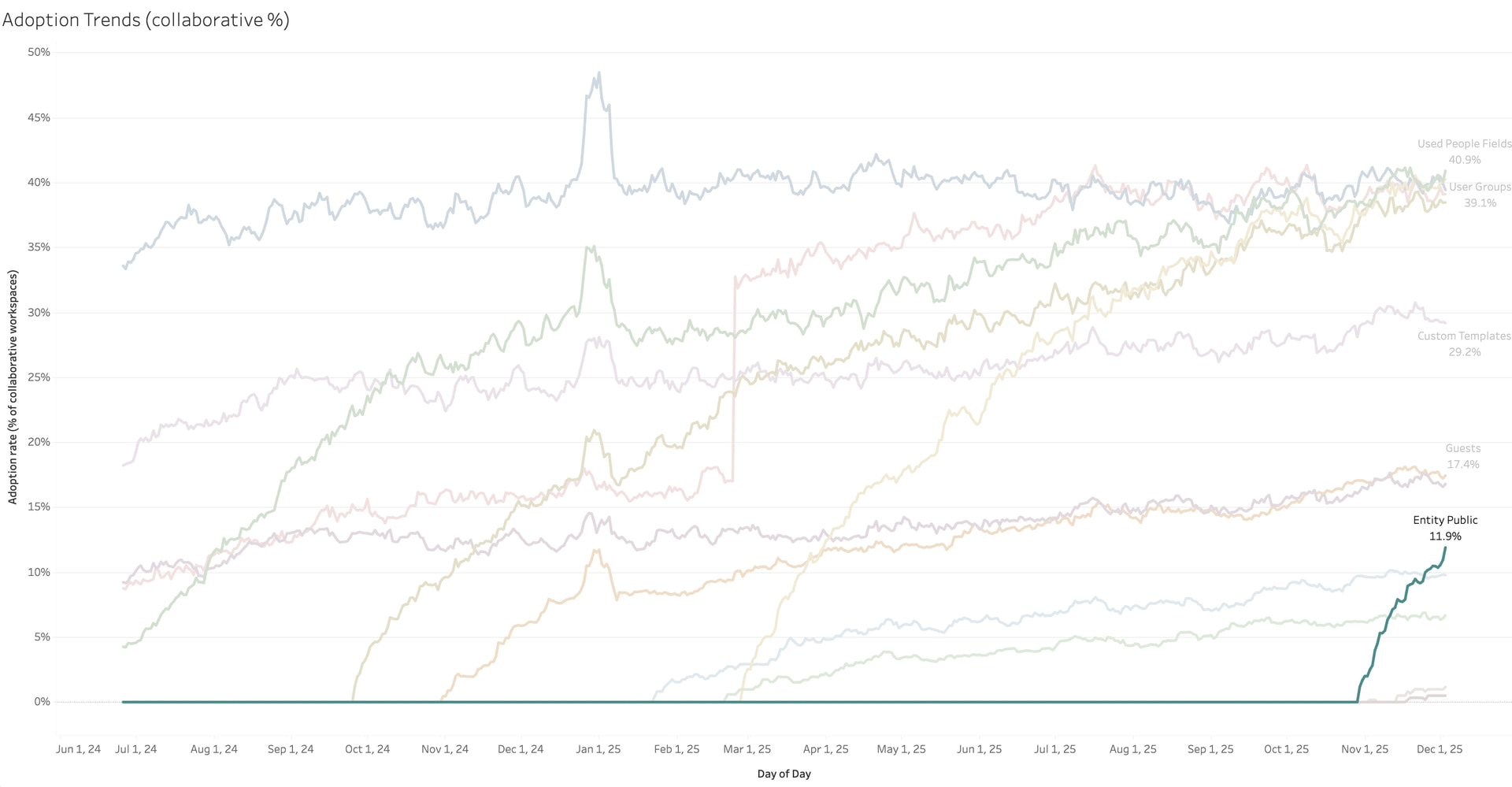
There hasn’t been much feedback which, in this particular case, is good news. The new sharing mechanism doesn’t include mentioned entities or assigned users, so we were unsure if there would be some uproar. It appears that people don’t miss those pieces much.
What’s even more telling is the fact that 82% of shares use the simplest and safest Viewer template:

Only in 18% cases, sharers extend the public access to related entities — which used to be the old mechanism’s default behavior.
When we look at the few custom access templates currently used for public sharing, those were created specifically for this purpose, not re-used from internal sharing.
Adoption: guests
Until now, we’ve had an impression that Guests have barely seen any adoption.
Yet, if we take workspaces with 10+ weekly active users, then 68% have Guests — making it the most adopted permission feature of the last three years:
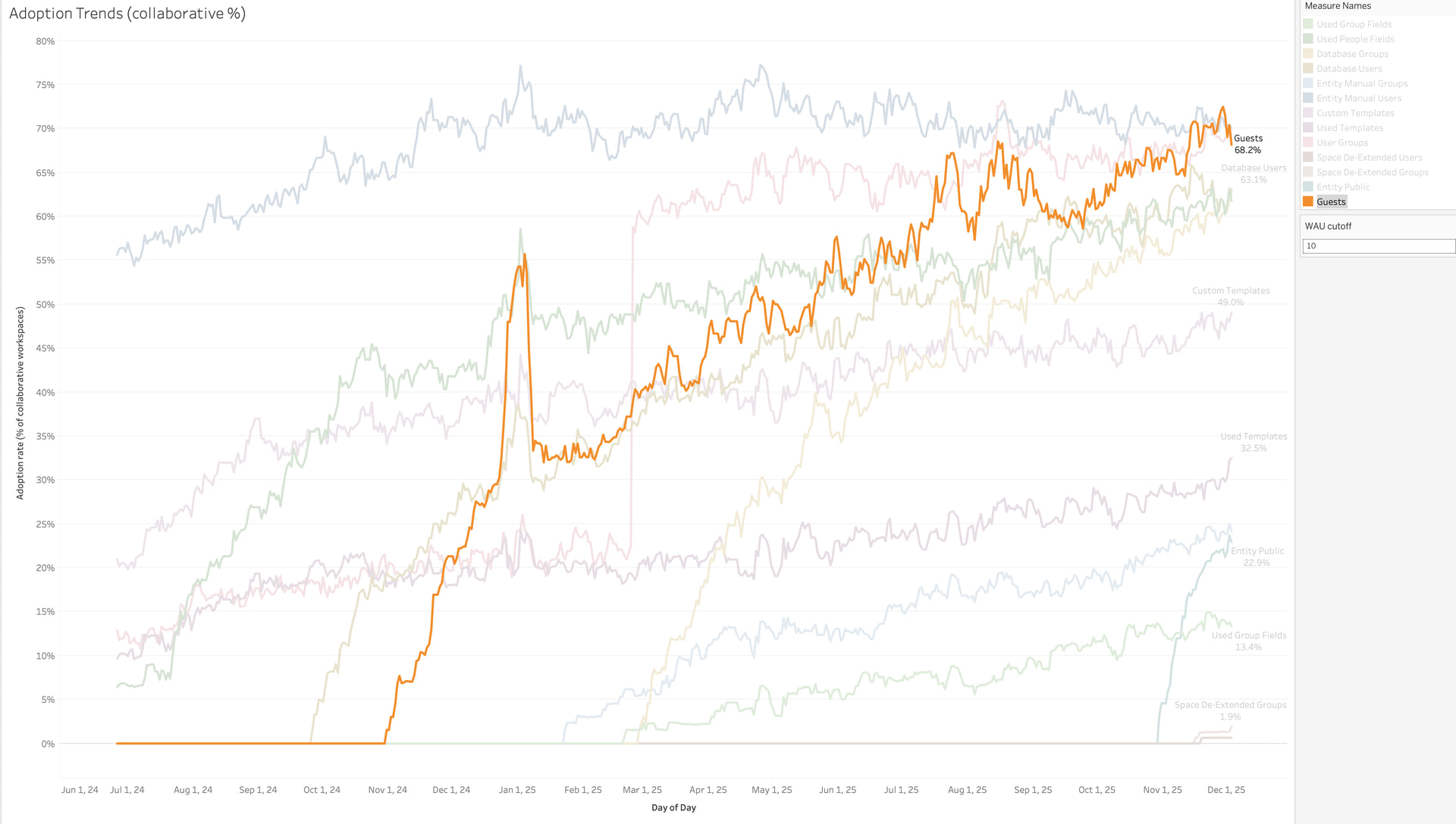
If we take all collaborative workspaces, though, it’s not that remarkable, just 17%:

Which is fine, since not everyone needs to work with external parties — especially in smaller workspaces.
Adoption: default access for entity creators
Since we rolled out Enable automatic Editor access via Created By by default for new Databases, more than 9K Databases across 1K workspaces got automatic access for those who create entities.
On one hand, we haven’t heard any complaints about oversharing. On the other hand, there hasn’t been a new support ticket with Submitters not being able to see and edit the entities they create.
So, hopefully, this new default accomplishes its purpose: simplifying access setup without compromising privacy.
Adoption: new Space and DB access templates
Once we renamed and standardized templates in the scope of Consolidate default access template names across Space, Database, and Entity levels, the customers behavior changed drastically.
Sharers have abandoned ex-Editor now-Owner template in favour of the proper Editor template:

At both the Space and the Database levels, the most popular template right now is the one that hadn’t even existed before the consolidation:

At the Space level, the newly introduced Viewer has seen some usage. What’s not so great is that even after Deprecate old Contributor Space access people continue to use Contributor, albeit twice less often:

Adoption: de-extending Space access 
What hasn’t seen any real adoption is Allow not to extend access from Space to its Entities:
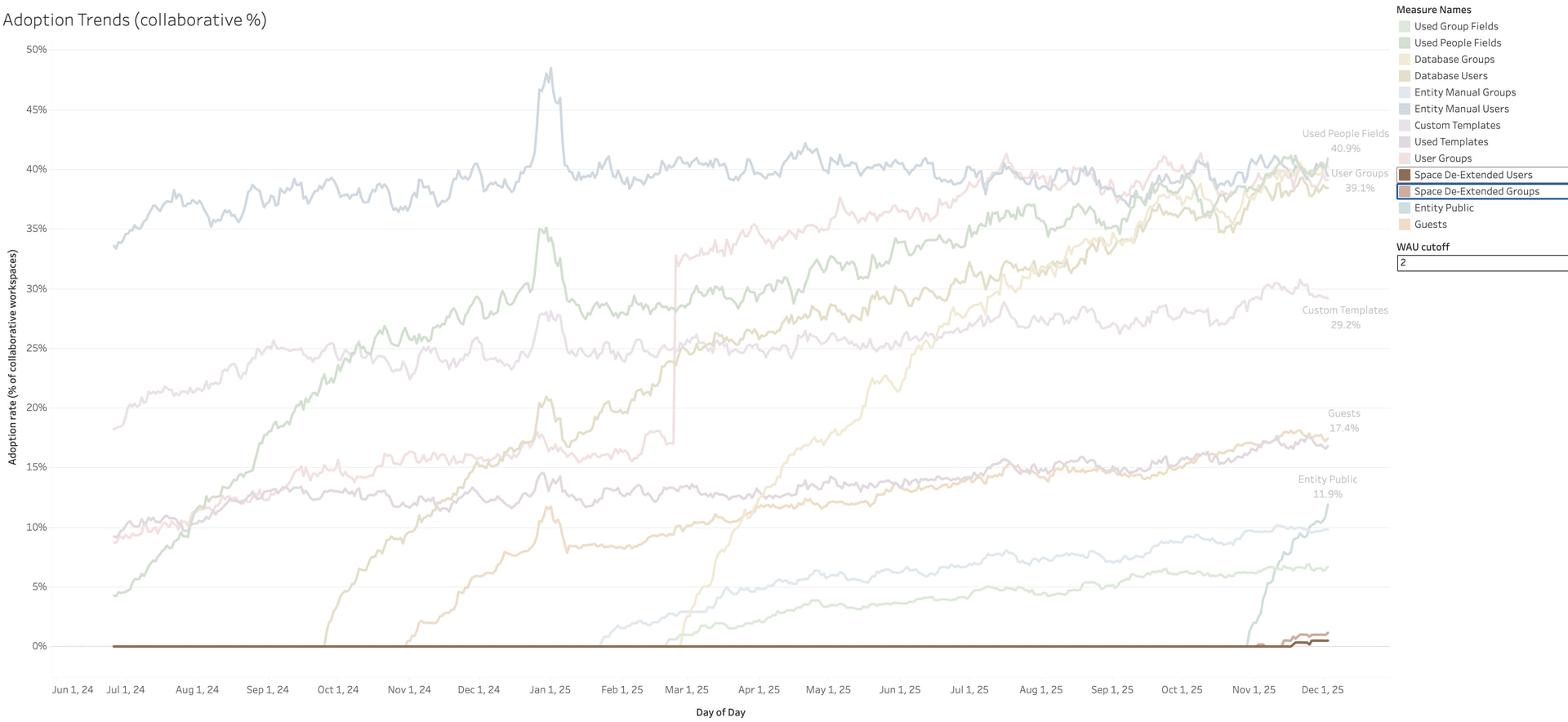
I realize it’s a power user functionality that is not so easy to grasp, but I expected at least some unnudged adoption…That’s a challenge for us to figure out when we switch from providing architects with more power to configure access in their workspaces to explaining and extracting this power.
In progress: custom access templates for Database access
In December, we plan to Introduce custom access templates for Databases access.
Whenever you want to grant access to edit but not create (or not delete), this feature is for you. With custom access templates for Database access, you will be able to assemble any combination of capabilities (e.g., read + create + edit) into a template to then use for sharing a Database.
We won’t invest in any UI for setting up the custom templates at this time, it’s mostly going to be a set of API endpoints that we will document and share. As soon as a custom template is created and configured by an Admin, any Database Architect can then use it just like a normal template from UI.
Next: access to users
The next major thing is Configure access to Users, and the roadmap is clear now:
- Share Users via access templates
- Automatically provide Group members access to each other
- Share with users with a particular email domain
- Introduce workspace email domain(s)
- Configure who can see Users
- Configure who can manage (invite, deactivate) Users
It’s not the fastest way to first value, but I believe it’s the right path for the long term. We will kickstart the endeavor this week and update the roadmap if we find a better way.
Once the access to users is ready, there will be two major things left to close the Granular Access theme:
- Add create capability to access templates
- Allow to hide Space data (entities) from Admins
Usability and simplicity
Not much was done here in November, since just partly Ihar and Eugene participated in this theme. However, December should be quite packed with improvements.
Done
Some small improvements were added here and there around Views:
- Hide “No parent” group in multi-level Smart Folders/Tables/etc (when empty)
- Quick Search for Feed View
- Simplify Report setup screen
Next
Many improvements for Views will be done:
- Editable quick filters
- Collapse and expand all levels for Grid View / List View / Gantt View
- Hierarchical list: ability to remove top level objects with keeping the rest
- Preserve all View settings when adding or removing databases where possible
- View Items Menu unification
- Reports performance boost: load less fields by default
Entity View will got some update:
- Quickly Show/Hide All Fields in Entity View
- and later Hide Entity Views based on rules

Some unexpected features
- Embed Mermaid (code → diagram) into rich text
- Architect vs. User modes for admins/creators to simplify casual Fibery use
Files field
We’ve released Gallery View (first release) and got a lot of positive feedback.

Cool!

—
I love the Gallery view.
—
Great to hear! I have big plans with gallery view as relation view
—
I LOVE gallery view – amazing work there, and fills a much needed gap in some of our data views!
—
I’m excited to
dig up from the recesses of my mindreconsider the opportunities for gallery views in my own space.
—
Holy shit, feels like the dawn of a new era. You could call this Fibery 3.0
It is hard to say that Gallery View became very popular right away, just around 150 people are visiting it daily in all accounts. Now it is on par with Gantt and Thread views.
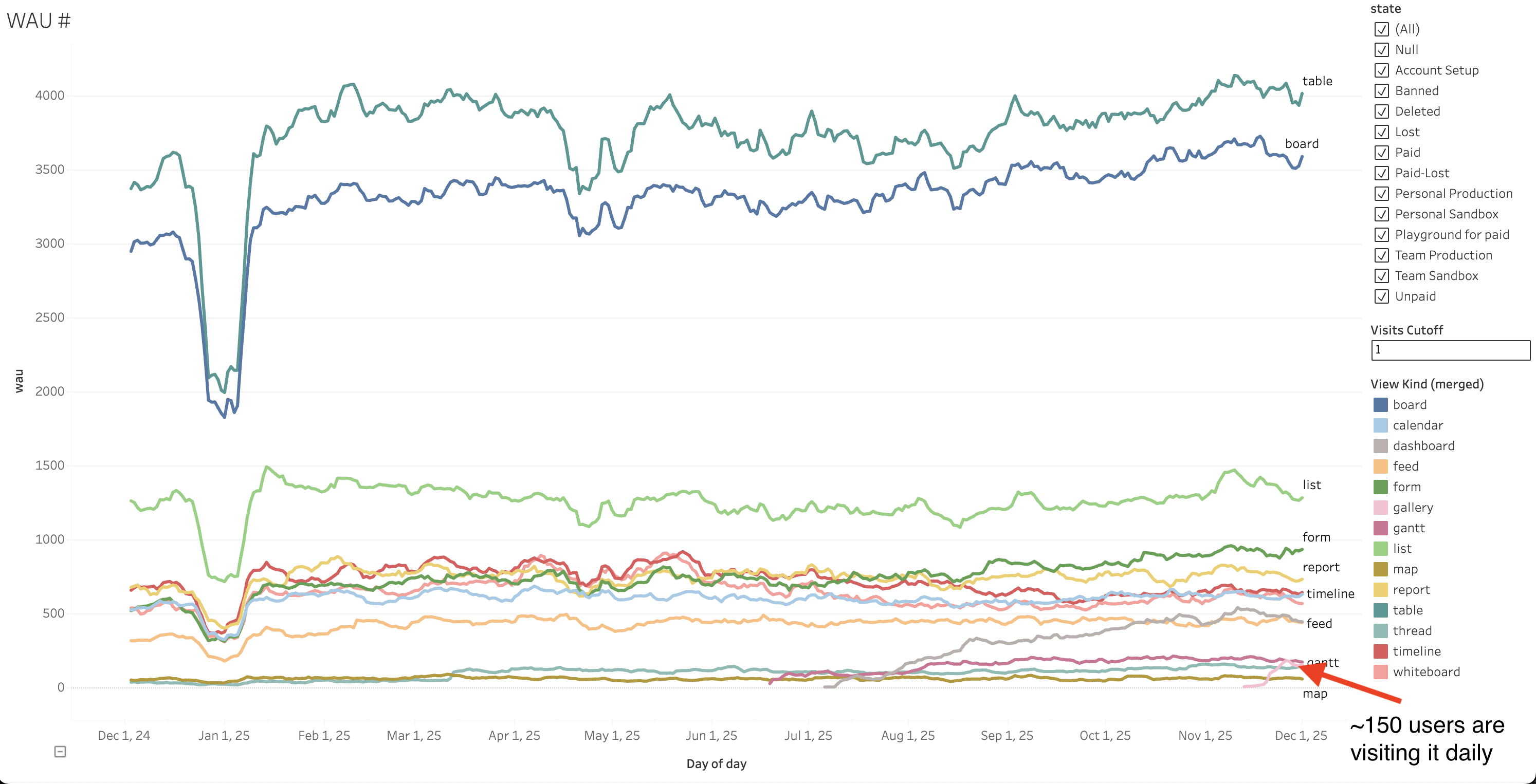
Let’s check recent Views addition (note that Gantt View is in Pro plan only). Gallery View has a decent start, while Dashboard is more popular than Whiteboard now.

We also released
- Open and preview file instead of downloading it
- Delete all files from a field
- Download all files as batch action in views
- Proper Files Fields support in integration
- Rename file
Next
The only missing thing in general are better units. Victor is working on all these features and it seems we will complete all of them in January only and conclude this theme:
- New File unit on Entity View
- File Unit visualization on Views

AI
We’ve released Migrate Fibery AI to Multi-Agent system and fixed bunch of bugs after release.
Overall, Build mode quality increased, less errors, and it works 3x faster, so in terms of technical solution we can consider it a success.
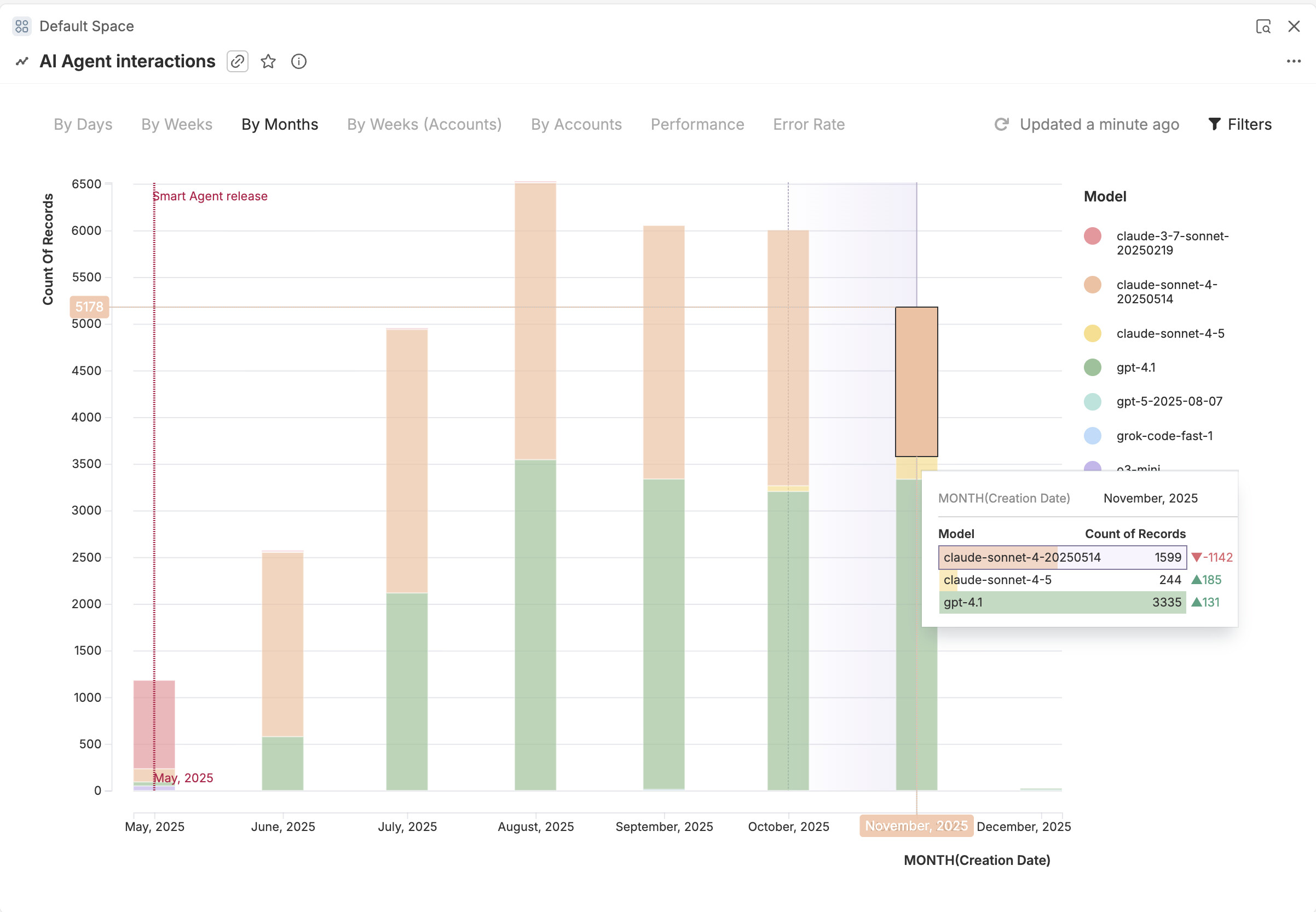
AI Agent usage in November dropped somewhat.
Next
Oleg is working on reports Create/Update a Report with AI and we all had several conversations about AI features unification and context for AI Agent in scope of huge feature Set AI Agent Context (Space, Database, Entity, View, …)
There are chances that initial release will happen in January with minimal context support, but most likely we will finish this re-design in February.
Then we will think how to make automations agent better, since right now it is not very reliable.
Automations
We barely started, Zauri is digging into this area to see what can be done with design and Sergey is working on Access previous values for rules in trigger filters and actions (via formula)
Next
Plans for December include:
- Duplicate automations to other databases
- Access the previous value for Rules
- Unite “Entities linked/unlinked” triggers with Entity Update trigger, allow to mix all fields via OR condition
Whiteboard
In the middle on November we released a big feature Insert views into the Whiteboard that lets users embed or add views and documents directly to the whiteboard, as well as embed external resources like YouTube videos or PDFs. We also added support for icon field.
Next
We’ve made cards on the whiteboard more flexible, now users can scale and resize them just like shapes.
Up next, we’ll also add more arrow types, improve connector behavior, and introduce a new shapes panel to support Enterprise Architecture diagrams. Users will also be able to upload their own icon and element packs.
- Add scale, resize and rotate for cards on Whiteboard
- Connector Tool
- New panel for Emojis and Stickers
Mobile
We released a beta version of our mobile clients for iOS and Android and received very positive feedback, with fewer issues than we expected. Right now we’re polishing the mobile interface before the public release in mid-December. After that, we’ll keep improving the UI and performance.
P.S. Your feedback, hearts, souls and punches are welcome! 

 . It’s already achievable, but the bar is somewhat high. We’ll make it work out of the box — hopefully, with a nicer UX.