# How to clean all test entities?
**URL:** https://community.fibery.io/t/how-to-clean-all-test-entities/9483
**Category:** Get Help
**Created:** [August 27, 2025, 3:54pm UTC](https://community.fibery.io/t/how-to-clean-all-test-entities/9483 "2025-08-27T15:54:39Z")
**Posts on this page:** 7
**Page:** 1
### Author:  [@Hendrik](https://community.fibery.io/u/Hendrik)
#### Post date: [August 27, 2025, 3:54pm UTC](https://community.fibery.io/t/how-to-clean-all-test-entities/9483/1 "2025-08-27T15:54:39Z")
Hi all,
Been ‘sandboxing’ with Fibery for some time and finally starting to figure out a company structure / workspace map to start with. No doubt it will change a lot still but after investing a lot of time in the platform, I have to start using it functionally now.
Problem is that there is quite a lot of test / throw-away data created. A great function of Fibery is to have ‘unlimited version’ history on the Pro Plan. Though I am not quite sure what exactly that means in practice, it seems from some posts on the forum that all entities are in fact stored in the main BD (workspace).
While we would like to retain most of our database structure and general workspace map and relations, we would like to be rid of all this ‘test data residue’ and start clean.
The most sensible thing would seem to create a new workspace but somehow transfer or convert the existing Workspace structure (schema?). Is that possible?
The templates / automations / scripts are few enough to copy over.
What would be the most efficient / easiest way achieve this?
Would appreciate any thoughts on this.
---
### Author:  [@Polina\_Zenevich](https://community.fibery.io/u/Polina_Zenevich)
#### Post date: [August 28, 2025, 7:04pm UTC](https://community.fibery.io/t/how-to-clean-all-test-entities/9483/2 "2025-08-28T19:04:46Z")
Hi!
I think that migrating to new workspace [with this feature can be the most handy option 🙂](https://the.fibery.io/@public/User_Guide/Guide/Share-Workspace-as-a-Template-57)
---
### Author:  [@Hendrik](https://community.fibery.io/u/Hendrik)
#### Post date: [August 28, 2025, 8:06pm UTC](https://community.fibery.io/t/how-to-clean-all-test-entities/9483/3 "2025-08-28T20:06:46Z")
Hi @Polina_Zenevich
Are you saying that it is possible to migrate using a template and somehow NOT transfer all the entities, but only the structure?
H
---
### Author:  [@Hendrik](https://community.fibery.io/u/Hendrik)
#### Post date: [September 2, 2025, 11:45am UTC](https://community.fibery.io/t/how-to-clean-all-test-entities/9483/4 "2025-09-02T11:45:02Z")
Hi guys,
I’m about to recreate the tables in a new workspace if need be. So just to confirm once more - there is no way to copy / migrate a structure (schema?) without also copying the fields / entities / data - is that correct?
Tnx!
---
### Author:  [@RonMakesSystems](https://community.fibery.io/u/RonMakesSystems)
#### Post date: [September 2, 2025, 11:57am UTC](https://community.fibery.io/t/how-to-clean-all-test-entities/9483/5 "2025-09-02T11:57:12Z")
Hey Henrik!
You can share the space as a template, and re-add it to your existing workspace:
> **[Share Space as a Template](https://the.fibery.io/@public/User_Guide/Guide/Share-Space-as-a-Template-56)**
You can also share a full workspace if you need multiple spaces.
When making the template, you have a toggle if you want to share the entities as well, or just the structure.
Just make sure to change the name of of the space after creating a template, or else it will tell you that there’s already an existing space with that name. Other than that it should work I think!
---
### Author:  [@Chr1sG](https://community.fibery.io/u/Chr1sG)
#### Post date: [September 2, 2025, 12:48pm UTC](https://community.fibery.io/t/how-to-clean-all-test-entities/9483/6 "2025-09-02T12:48:01Z")
> [@RonMakesSystems](#):
>
> Just make sure to change the name of of the space after creating a template, or else it will tell you that there’s already an existing space with that name.
FYI this is only an issue if you reimport into the same workspace
---
### Author:  [@Hendrik](https://community.fibery.io/u/Hendrik)
#### Post date: [September 3, 2025, 10:57am UTC](https://community.fibery.io/t/how-to-clean-all-test-entities/9483/7 "2025-09-03T10:57:15Z")
Thank you all for assisting.
> [@RonMakesSystems](#):
>
> You can share the space as a template, and re-add it to your existing workspace:
Thanks Ron! @Polina_Zenevich Thank you also - I thought I had unchecked entities and they mysteriously copied over anyway… But, I probably didn’t - tried it again and this works perfectly, thank you.
> [@Chr1sG](#):
>
> > [@RonMakesSystems](#):
> >
> > Just make sure to change the name of of the space after creating a template, or else it will tell you that there’s already an existing space with that name.
>
> FYI this is only an issue if you reimport into the same workspace
I saw the option to create the space in the same workspace, but then got the warning about the Space and… perhaps when I saw the red letter warning I did not read the second sentence which tells us what the solution is!
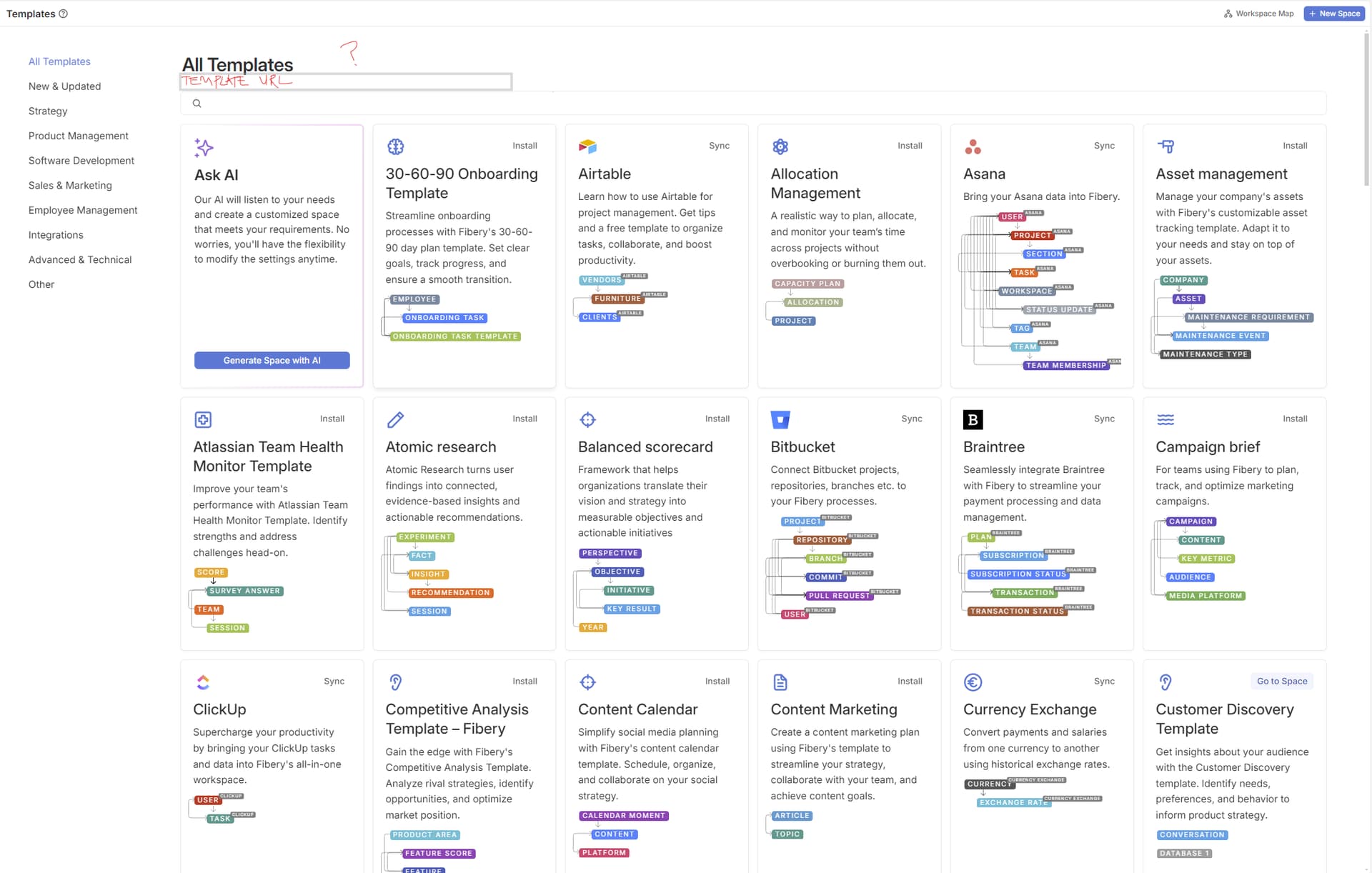
_Just a bit of feedback re the Space sharing thing. There is this option to create a space from Templates. I expected to see the option for shared space templates here, but no. Instead, we need to paste the template URL in the browser. It all works fine, it’s just a bit of strange way to implement a function in an app (instead of a button). Also, in the desktop app there seems to be no way to use this function since the new tabs don’t allow for pasting a URL (just copying). None of this is a big deal to us since the functionality works - just sharing my experience_
What I might have expected:
* * *
**Incidentally, it seems the help file needs to be updated ?**

